
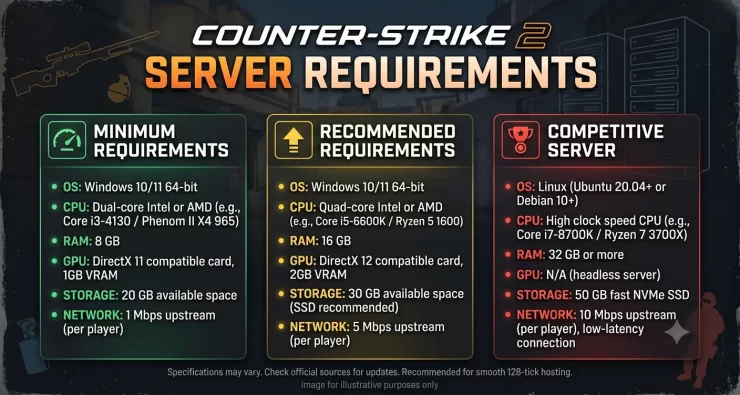
Counter-Strike 2 server requirements are not the same as the PC requirements shown on Steam. A dedicated server processes game logic, player connections, maps, plugins, logs, and network traffic, but it does not render the game for a local player.
For a small private or 5v5 server, a sensible starting point is 2 fast CPU threads, 4 GB RAM, and 60 GB of SSD space. For a public community server, 4 CPU threads and 6–8 GB RAM provide more room for plugins, GOTV, larger player counts, and background services.
Valve’s Steam page lists 8 GB RAM and 85 GB storage for the CS2 client. Those figures should not be presented as dedicated-server minimums. Valve does not publish a separate simple hardware table for the dedicated server in the sources checked here, so the sizing figures below are practical recommendations, not official Valve minimums.
Try DatHost Counter-Strike 2 Hosting
Counter-Strike 2 Server Requirements at a Glance
| Use case | CPU | RAM | Storage | Network | Best fit |
|---|---|---|---|---|---|
| Private / 5v5 practice | 2 fast threads | 4 GB | 60 GB SSD | Stable, low-latency connection | Home server or VPS |
| 10–20 player community | 2–4 fast threads | 4–6 GB | 60–80 GB SSD | Public IP, low jitter | Quality VPS |
| 20–32 players + plugins/GOTV | 4 fast threads | 8 GB | 80 GB+ SSD/NVMe | Datacenter network, DDoS protection | VPS/dedicated |
| Multiple CS2 instances | 4–8+ modern threads | 8–16+ GB | 100 GB+ NVMe | 1 Gbps-class datacenter link | Dedicated server |
A widely used, actively maintained CS2 Docker image currently lists 2 CPUs, 2 GiB RAM, and 60 GB free disk as its minimum container requirements. Treat that as a deployment floor, not a target for a busy public server.
CS2 CPU Requirements
CPU choice matters once the server has enough RAM. For one CS2 instance, prioritize modern per-core performance instead of buying many slow virtual cores.
Start with two fast CPU threads for private 5v5 use. Move to four threads when you expect more players, plugins, GOTV, monitoring agents, or other services on the same machine. Extra physical cores become much more useful when you run several CS2 instances because the processes can be spread across the CPU.
Cheap VPS plans can be misleading here. Four heavily shared vCPUs may deliver less consistent processing time than two faster cores on a host with lower contention.
A 10-player practice server therefore does not need a 16-core processor. A newer CPU with strong per-core speed and two to four available threads is usually a better fit. A tournament host running several simultaneous servers needs both strong per-core performance and enough total cores to keep instances from competing for CPU time.
A gaming GPU is not normally required. The dedicated server runs headlessly; spend the budget on CPU, RAM, SSD storage, and networking instead. Current Linux deployments run CS2 as a headless dedicated process without a graphical game client.
How Much RAM Does a CS2 Server Need?
Two gigabytes appears as a minimum in current community deployment projects, but that leaves little operating margin. For a new self-hosted server, 4 GB is a safer starting allocation.
Use these ranges:
- 4 GB: Private matches, team practice, basic 5v5.
- 4–6 GB: Public server with more players and a modest plugin set.
- 8 GB: Larger community server, GOTV, heavier plugins, or supporting services.
- 8–16+ GB: Several CS2 instances on one VPS or dedicated machine.
Memory use can rise with plugin frameworks, custom content, databases, web panels, Docker, logging, and monitoring. Leave headroom rather than sizing around an idle-memory reading.
More RAM does not automatically improve a lightly loaded server. Once the game process and OS have enough memory, CPU consistency and network quality become more important.
This is also an area where current guides disagree. Some 2026 hosting guides recommend around 2 GB for a simple 10-player server, while others start much higher. That is why fixed third-party RAM numbers should be treated as planning estimates rather than Valve specifications.
CS2 Storage Requirements
For self-hosting, reserve at least 60 GB of free SSD space for a basic deployment. The maintained CS2 Docker project referenced above currently requires 60 GB and notes that mods may need more.
Do not size the disk only around the first SteamCMD download. Leave room for updates, temporary files, logs, crash dumps, GOTV demos, plugins, Workshop content, and backups. For one server, 60–80 GB is a useful planning range; allocate more if you store recordings or custom content.
Use an SSD instead of an HDD. NVMe is useful for multi-instance servers and frequent backup/update activity, although a good SATA SSD is adequate for many single-server deployments.
Steam’s 85 GB figure applies to the game client, not an official dedicated-server minimum.
Linux vs Windows for a CS2 Dedicated Server
Linux is a practical choice for VPS and dedicated hosting because it runs cleanly without a graphical desktop and is easy to manage with systemd, Docker, shell scripts, SSH, and scheduled update jobs.
Windows is reasonable if your administration workflow depends on Windows tools or you are much more comfortable managing it. The tradeoffs can include higher OS overhead and licensing cost on commercial infrastructure.
On Linux, run SteamCMD and CS2 under a dedicated unprivileged user rather than root. Current CS2 deployment workflows use Steam App ID 730, and current Linux deployments install the server through SteamCMD using that ID.
Steam’s Game Server Account Management page is where server owners create and manage Game Server Login Tokens (GSLTs). Valve also lists account conditions for creating those tokens, including an eligible Steam account and registered phone.
CS2 Network and Bandwidth Requirements
Do not choose a CS2 host from bandwidth speed alone. A fast link with poor routing, jitter, or packet loss can produce a worse match than a slower but stable connection.
Prioritize:
- Low round-trip latency to most players
- Low jitter
- Minimal packet loss
- Enough upstream capacity for all players
- Wired Ethernet for home hosting
- A public IP or correct NAT/port forwarding
- DDoS protection for public servers
For home hosting, upload quality is usually the constraint. Some residential ISPs also use CGNAT, which can prevent normal inbound port forwarding unless the ISP supplies a public address.
Server location matters as much as the plan. Put the server near the majority of players, not merely near the administrator.
Avoid old CS:GO sizing advice based on supposed “128-tick CS2 requirements.” Steam currently describes CS2 as having “tick-rate-independent gameplay,” and Valve explained that its sub-tick design was intended to separate important gameplay events from traditional tick boundaries.
Old CS:GO tick-rate formulas are therefore a poor foundation for a 2026 CS2 hardware guide. Current search results still contain conflicting claims about 64- and 128-tick CS2 hosting, which is another reason not to build hardware recommendations around those claims.
CS2 Dedicated Server Ports
The default game-server port is commonly 27015. Current maintained CS2 Docker examples publish 27015/UDP and 27015/TCP, plus 27020/UDP for GOTV-related traffic.
Open only the ports your configuration uses. If you change the listen port, run multiple instances, or expose RCON separately, adjust the firewall and NAT rules to match.
On Linux, confirm listening sockets with:
ss -lntup
That is safer than opening a wide Steam port range without checking which ports the server actually uses.
For home hosting, remember that an OS firewall rule does not create a router port-forward. Both layers must point traffic to the correct server.
CS2 Server Requirements by Player Count
There is no Valve-certified RAM-per-player formula. Player count is only one sizing factor; plugins, GOTV, custom content, and multiple processes can matter just as much.
| Server type | Players | CPU | RAM | Storage | Hosting |
|---|---|---|---|---|---|
| Private practice | 2–10 | 2 fast threads | 4 GB | 60 GB | Home/VPS |
| Competitive 5v5 | 10 | 2 fast threads | 4 GB | 60 GB | VPS |
| Community | 10–20 | 2–4 fast threads | 4–6 GB | 60–80 GB | VPS |
| Plugin-heavy | 20–32 | 4 fast threads | 8 GB | 80 GB+ | VPS/dedicated |
| Multiple instances | Varies | 4–8+ threads | 8–16+ GB | 100 GB+ | Dedicated |
Plugins can change resource use more than a few additional player slots. Databases, web panels, GOTV recording, statistics tools, monitoring services, and multiple game processes all consume resources outside the basic CS2 process.
The better method is to start with headroom, then monitor CPU saturation, memory pressure, and network behavior during full matches. Resize from actual measurements rather than an arbitrary “GB per player” rule.
Home Server vs VPS vs Dedicated vs Managed CS2 Hosting
Home hosting is inexpensive if you already own the machine and works well for private practice. Its weak points are residential upload quality, CGNAT, port forwarding, power outages, and limited DDoS protection.
A VPS is usually the best middle ground for one community server. You get a public IP, datacenter networking, remote administration, and freedom to install SteamCMD, plugins, firewalls, and monitoring. Check whether CPU resources are heavily shared.
A dedicated server is better for multiple instances or communities that need predictable CPU access. It also means you are responsible for OS patching, monitoring, backups, security, and game updates.
A managed CS2 host removes much of that administration.
DatHost: A Managed Alternative to Self-Hosting
DatHost is a practical option for teams and community admins who want to manage the game rather than the operating system.
Its current CS2 hosting page lists Ryzen 9 7950X-class or EPYC CPUs, 16 GB DDR5 RAM, 30 GB enterprise SSD storage, DDoS protection, automatic updates and backups, instant server relocation, a game control panel, and a 10 Gbps+ network uplink.
DatHost also supports multiple global server locations, allowing you to move the server closer to your player base rather than rebuilding it in another datacenter.
Its 30 GB managed storage allocation should not be compared directly with the 60 GB self-hosting recommendation above. With managed hosting, DatHost controls the underlying game deployment and infrastructure. On your own VPS, you need room for SteamCMD, OS files, update staging, logs, tools, and your own backup strategy.
DatHost makes the most sense for team practice, scrims, private matches, and community admins who do not want to maintain Linux or Windows, SteamCMD updates, firewall rules, and backups themselves.
Choose VPS or dedicated infrastructure instead when you need root access, custom system services, unusual networking, or several non-CS2 workloads on the same machine.
Common CS2 Server Hardware Mistakes
Avoid buying by vCPU count alone. Check what processor backs the VPS and whether its CPU time is heavily shared.
Do not allocate the absolute minimum RAM with no room for the OS, plugins, or update processes.
Do not put an active server on a slow HDD simply because CS2 is not a database application. Updates, map changes, logs, demos, and backups still involve storage I/O.
Pick a datacenter near your players, not simply the cheapest available region.
Most importantly, do not copy CS:GO launch flags, tick-rate claims, networking cvars, or port lists into a CS2 configuration without checking them first. Current search results contain conflicting hardware and networking advice, including dramatically different RAM recommendations and outdated tick-rate assumptions.
Conclusion
For most small Counter-Strike 2 servers, start with 2 fast CPU threads, 4 GB RAM, and 60 GB of SSD space. Move toward 4 CPU threads and 6–8 GB RAM for public communities, plugins, GOTV, or heavier workloads. Multiple instances justify more cores, memory, and NVMe storage.
Do not confuse client specifications with dedicated-server requirements, and do not size a 2026 CS2 deployment from old CS:GO tick-rate advice. Monitor the server under real player load and adjust from measured CPU, memory, and network behavior.
If you want root access and full system control, use a good VPS or dedicated machine. If you prefer to avoid SteamCMD maintenance, OS patching, firewall work, and manual backups, DatHost provides a managed CS2 option designed around those operational tasks.
Frequently Asked Questions
How much RAM does a CS2 server need?
Use 4 GB RAM for a small private or 5v5 server as a sensible starting point. Some deployments can run with less, but 4 GB leaves room for the OS and normal overhead. Use 6–8 GB for larger public servers, plugins, GOTV, or supporting services.
How many CPU cores does a CS2 server need?
Start with two fast CPU threads for one small server. Four threads are safer for larger communities, plugin-heavy setups, or background services. For multiple instances, increase total core count while keeping strong per-core performance.
Can I host a CS2 server on a VPS?
Yes. A VPS works well if it provides fast CPU time, enough RAM, SSD storage, a public IP, and stable low-latency networking. Avoid heavily oversold VPS plans where CPU performance changes sharply during busy periods.
Does a CS2 Dedicated Server Need a GPU?
No gaming GPU is normally required. The server runs headlessly and does not render the match for a local player. CPU performance, memory, storage, and network quality deserve the budget instead.