Last Updated on 10 Sep 2026
Choosing the best modded Minecraft server hosting means matching your modpack, player count, and performance needs with the right server. Heavy packs such as RLCraft, Better MC, All the Mods, and SkyFactory need more RAM and CPU power than vanilla Minecraft.
A good host should support popular mod loaders such as Forge, Fabric, and NeoForge, provide fast SSD or NVMe storage, offer backups and DDoS protection, and let you install popular or custom modpacks without unnecessary setup.
For most players, Godlike Host is our top pick because it combines affordable pricing, modern mod-loader support, popular modpack installation, backups, and strong hardware. DatHost is a strong choice for performance-focused servers, while Apex Hosting is best for beginners who want a simple one-click experience.
TL;DR
- Best overall: Godlike Host
- Best for performance: DatHost
- Best for beginners: Apex Hosting
- Best for flexible setups: Zap-Hosting
- Best budget option: Shockbyte
- Best for long-term stability: HostHavoc
- Best VPS with full control: Kamatera
If you are still choosing a modpack, see our guide to the Best Minecraft Modpacks to Play With Friends in 2026.
Also Read: How to Set Up a Modded Minecraft Server
Best Modded Minecraft Server Hosting Comparison
| Rank | Provider | Best For | Mod Support | Recommended RAM | Starting Price* |
|---|---|---|---|---|---|
| #1 | Godlike Host | Best overall value | Forge, Fabric, NeoForge, popular modpacks | 6 GB to 16 GB+ | From $6 first purchase |
| #2 | DatHost | Performance-focused servers | Forge, Fabric, NeoForge, CurseForge | 16 GB included | €14.90/month |
| #3 | Apex Hosting | Beginners and one-click setup | Forge, Fabric, NeoForge, 200+ modpacks | 4 GB to 16 GB+ | From $11.24 first month |
| #4 | Zap-Hosting | Flexible modded configurations | Forge, Fabric, NeoForge, FTB, Technic | 4 GB to 12 GB+ | From about $3.23/month |
| #5 | Shockbyte | Budget modded hosting | Forge, Fabric, NeoForge, CurseForge, Modrinth | 4 GB to 12 GB+ | From $11.19/month at current promo |
| #6 | HostHavoc | Stable long-term servers | Modpacks, custom packs, CurseForge, Modrinth | 4 GB to 16 GB+ | About $11.25/month for modded entry |
| #7 | Kamatera | VPS and full root control | Any compatible loader, manual setup | 8 GB to 16 GB+ | From $4/month |
*Prices can change by plan, promotion, billing term, and region. Heavy modpacks usually need a higher-tier plan than the cheapest advertised option.
1. Godlike Host – Best Overall Modded Minecraft Hosting
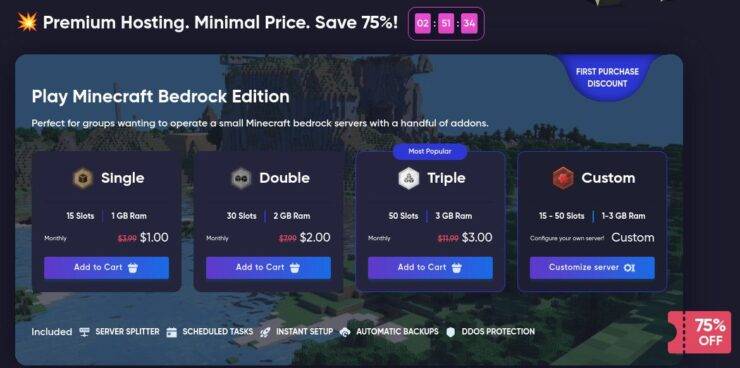
Godlike Host is our top choice for players who want a good balance of price, performance, and mod support. It supports Forge, Fabric, and NeoForge, along with popular modpacks from CurseForge and Modrinth.
It also provides automatic backups, DDoS protection, SFTP access, and modern Ryzen or EPYC hardware. This makes it suitable for small friend groups as well as larger modded worlds.
Best for: Players who want affordable modded hosting without giving up modern modpack features.
Key features
- Forge, Fabric, and NeoForge support
- CurseForge and Modrinth modpacks
- Custom modpack uploads
- Automatic backups
- DDoS protection
- SFTP file access
Keep in mind: Compare promotional and renewal pricing before choosing a long-term plan.
2. DatHost – Best for Performance-Focused Servers
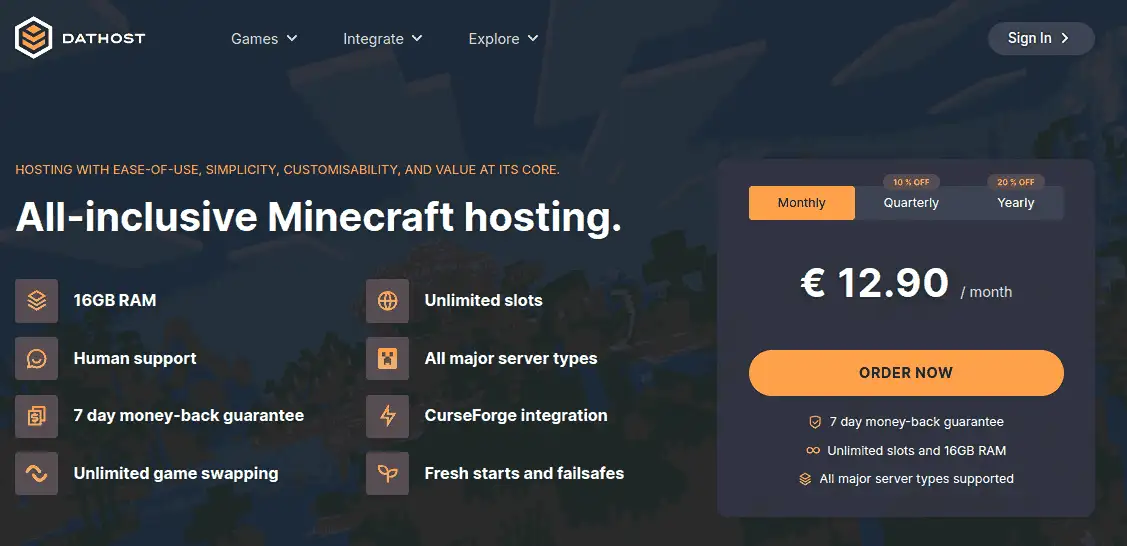
DatHost is a strong option for demanding modded servers. Its Minecraft plan includes 16 GB DDR5 RAM, NVMe storage, high-frequency AMD processors, DDoS protection, and daily backups.
DatHost supports Forge, Fabric, and NeoForge. It also offers one-click CurseForge installation and lets you upload custom mods and modpacks.
Best for: Players who want plenty of RAM and strong CPU performance without managing a VPS.
Key features
- 16 GB DDR5 RAM included
- High-frequency AMD CPUs
- NVMe storage
- Forge, Fabric, and NeoForge support
- One-click CurseForge installation
- Daily backups and DDoS protection
Keep in mind: The fixed 16 GB plan may be more than you need for a very small server.
3. Apex Hosting – Best for Beginners

Apex Hosting is one of the easiest options for running a modded Minecraft server. Its panel supports Forge, Fabric, and NeoForge and provides one-click installation for hundreds of popular modpacks.
You also get automated backups, DDoS protection, FTP access, and an easy upgrade path when your pack or player count grows.
Best for: First-time server owners who want to launch a modpack quickly with minimal technical work.
Key features
- Forge, Fabric, and NeoForge support
- One-click installation for 200+ modpacks
- Automated backups
- DDoS protection
- FTP file access
- Beginner-friendly control panel
Keep in mind: It costs more than some budget providers, especially when you need higher RAM plans.
4. Zap-Hosting – Best for Flexible Modded Setups
Zap-Hosting is useful if you want flexibility when switching between Minecraft versions, loaders, and modpacks. It supports Forge, Fabric, and NeoForge, plus modpacks from ecosystems such as CurseForge, FTB, Technic, and ATLauncher.
FTP access, backup tools, and DDoS protection make it suitable for custom configurations without requiring you to manage a full Linux VPS.
Best for: Players who test different modpacks or want more configuration options than a basic one-click host.
Key features
- Forge, Fabric, and NeoForge support
- FTB, CurseForge, Technic, and ATLauncher packs
- Modpack and game switching
- FTP access
- Backup tools
- DDoS protection
Keep in mind: Resource allocation can vary by configuration, so check RAM and CPU details before ordering a heavy modpack server.
5. Shockbyte – Best Budget Modded Minecraft Hosting

Shockbyte is a practical choice for budget-conscious players who still want broad modpack support. Its panel supports Forge, Fabric, and NeoForge, with access to CurseForge, Modrinth, and a large library of one-click modpacks.
Shockbyte also provides automatic backups, FTP access, DDoS protection, and multiple server locations.
Best for: Small friend groups and players who want an affordable entry point into modded Minecraft hosting.
Key features
- Forge, Fabric, and NeoForge support
- Large one-click modpack library
- CurseForge and Modrinth support
- Custom modpacks
- Automatic backups
- DDoS protection
Keep in mind: Avoid the smallest RAM plans for demanding modpacks. Start around 4 GB for light packs and 6 GB to 8 GB or more for heavier setups.
6. HostHavoc – Best for Stable Long-Term Servers
HostHavoc is a good fit for long-running modded worlds where reliability, backups, and file management matter. Its Minecraft hosting uses NVMe storage, dedicated CPU resources, DDoS protection, and scheduled backup tools.
It also supports popular modpacks from CurseForge, Modrinth, FTB, and other sources. FTP access lets you upload custom files when needed.
Best for: Established communities that value stable operation and easy backup restoration.
Key features
- NVMe storage
- Dedicated CPU resources
- Scheduled backups and restore tools
- DDoS protection
- CurseForge and Modrinth support
- FTP file access
Keep in mind: It may not be the cheapest option for small or temporary servers.
7. Kamatera – Best VPS for Full Control
Kamatera is different from the game-server providers above. It gives you a cloud VPS with root access, so you install and manage Java, Minecraft, Forge, Fabric, NeoForge, mods, backups, and firewall rules yourself.
The main advantage is flexibility. You can choose your CPU, RAM, storage, operating system, and location, then scale resources as your server grows.
Best for: Experienced Linux users who want full control over the Minecraft server environment.
Key features
- Full root access
- Flexible CPU and RAM options
- NVMe storage
- Multiple datacenter locations
- DDoS protection
- Manual support for any compatible mod loader
Keep in mind: There is no Minecraft-specific one-click modpack panel. You are responsible for setup, security, updates, tuning, and backups.
Best Hosting for Popular Minecraft Modpacks
Different modpacks require different amounts of RAM, CPU power, and configuration. A lightweight pack for a few friends can run comfortably on a smaller plan, while large packs such as All the Mods may need significantly more resources.
| Modpack | Recommended Host | Starting RAM | Best For |
|---|---|---|---|
| RLCraft | Godlike Host | 8 GB | Easy setup and demanding survival gameplay |
| Better MC | Godlike Host | 8 GB | Large adventure and exploration packs |
| All the Mods 10 | DatHost | 12–16 GB | Resource-heavy modpacks |
| SkyFactory | Apex Hosting | 6–8 GB | Simple one-click deployment |
| Custom Modpacks | Kamatera | 8–16 GB+ | Full control over Java, mods, and server files |
These RAM figures are starting estimates. Player count, explored chunks, automation systems, world-generation mods, and modpack versions can increase resource usage.
Check the Mod Loader, Minecraft Version, and Java Version
Before buying a server, confirm which mod loader your modpack requires.
- Forge: Commonly used by large and established modpacks.
- NeoForge: Used by many newer Minecraft mods and modpacks.
- Fabric: Lightweight and popular for performance-focused and modern mods.
You should also check the exact Minecraft and Java versions required by your modpack. Using an incompatible Java version, loader version, or Minecraft release can prevent the server from starting or cause mods to fail.
Which Hosting Is Best for Heavy Minecraft Modpacks?
For resource-heavy modpacks, prioritize CPU performance, RAM, and fast storage instead of choosing a host based only on its lowest advertised price.
DatHost is a strong option for demanding modpacks because its Minecraft hosting provides high RAM capacity, modern CPU resources, NVMe storage, and support for popular mod loaders.
Godlike Host is another good choice if you want flexible RAM plans and easier installation of popular modpacks.
For very customized servers where you need complete control over Java, startup parameters, mods, and operating-system settings, Kamatera is more suitable because you manage the Minecraft server on your own VPS.
How to Choose the Best Modded Minecraft Server Hosting
You do not need the most expensive server. You need enough resources for your exact modpack and player count.
Check the Mod Loader and Modpack
Confirm whether your pack uses Forge, Fabric, or NeoForge and whether your host supports the exact Minecraft and loader version. If possible, choose a provider with one-click support for CurseForge, Modrinth, FTB, Technic, or the platform your modpack uses.
Choose Enough RAM
Use these figures as starting points:
| Workload | Players | Starting RAM |
|---|---|---|
| Light modpack | 2 to 5 | 4 GB |
| Medium modpack | 5 to 10 | 6 to 8 GB |
| Heavy modpack | 5 to 10 | 8 to 12 GB |
| Very heavy pack or larger community | 10+ | 12 to 16 GB+ |
Mod count alone does not determine performance. World-generation mods, machines, mobs, chunk loaders, and large automated bases can increase server load quickly.
Do Not Ignore CPU Performance
Once your server has enough RAM, CPU speed often becomes the main performance limit. Modded Minecraft benefits from strong single-thread performance, especially during chunk generation, entity processing, redstone, and automation.
Look for a modern high-clock CPU, enough RAM, and NVMe or fast SSD storage. Adding more unused RAM will not fix a slow CPU.
Check Backups, DDoS Protection, and File Access
Modpack updates can break worlds. Prefer hosts with scheduled or automatic backups and easy restore tools. Public servers should also include DDoS protection.
FTP, SFTP, or a good file manager is useful when you need to upload custom mods, configs, dependencies, or complete server packs.
Choose a Nearby Server Location
Pick a datacenter close to most of your players. A nearby location can reduce latency and improve responsiveness, especially when players connect from the same country or region.
Shared Minecraft Hosting vs VPS
Choose Minecraft-specific hosting if you want one-click modpacks, a game control panel, backups, DDoS protection, and less server administration.
Choose a VPS such as Kamatera if you need root access or want to install custom services beside Minecraft. A VPS gives you more control, but you must manage Linux, Java, firewall rules, security, updates, monitoring, and backups yourself.
For most players, managed Minecraft hosting is simpler. A VPS makes more sense for experienced administrators or highly customized environments.
Final Verdict
Godlike Host is our top overall choice for modded Minecraft hosting because it combines competitive pricing with Forge, Fabric, NeoForge, popular modpack support, backups, and modern server hardware.
Choose DatHost if you want strong CPU performance and 16 GB RAM in a straightforward plan. Choose Apex Hosting if ease of use and one-click modpack installation are your priorities.
Zap-Hosting is best for flexible modpack configurations, while Shockbyte is a practical budget option for smaller groups. HostHavoc suits long-running communities that value stability and backups. Kamatera is the better fit when you need full root access and are comfortable managing the complete Linux server yourself.
Before buying, match the host to your modpack, loader, player count, RAM requirement, CPU needs, and server location. These factors matter more than choosing the cheapest advertised plan.
Frequently Asked Questions (FAQ)
The best hosting depends on your needs. For most users, Apex Hosting is the best overall due to its ease of use and strong mod support. If you're running heavy modpacks, BisectHosting is a better choice. For budget users, Shockbyte is a good starting point. Zap-Hosting and Apex Hosting are strong choices for RLCraft and similar heavy modpacks. These providers handle higher RAM usage and multiple mods more reliably than budget options. Yes, Shockbyte works for modded servers, especially for small setups or tight budgets. However, it may require more manual configuration and is not ideal for large or complex modpacks. Yes, most Minecraft hosting providers allow custom modpack installation. Premium hosts often offer one-click installs, while budget providers may require manual uploads using FTP. VPS hosting (like Kamatera) offers more control and better performance, but it requires technical knowledge. It’s best for advanced users running custom setups or large servers. What is the best hosting for modded Minecraft servers?
Which hosting is best for RLCraft or heavy modpacks?
Is Shockbyte good for modded Minecraft servers?
Can I install custom modpacks on these hosting providers?
Is VPS hosting better for modded Minecraft?
- 👉
- 👉
- 👉
- 👉
- 👉
- 👉
- 👉
- 👉
- 👉
- 👉
- 👉
- 👉