Running your own Soulmask server gives you control over player access, world settings, backups, mods, and when the world stays online. The main question is how much hardware you actually need.
According to the Soulmask private-server documentation, a single dedicated-server process requires at least 16 GB of RAM and 2–4 CPU cores. The documentation also lists roughly 20 GB of free disk space and around 100 Kbps of inbound and outbound bandwidth per connected player. Soulmask dedicated servers can run on Linux Server or Windows Server.
Those figures are a starting point, not necessarily the best configuration for every server. A long-running world with large bases, active tribes, many NPCs, mods, and 20 simultaneous players can need considerably more memory than a new private world for three friends.
This guide explains the Soulmask server requirements for CPU, RAM, storage, networking, player counts, Linux, Windows, and home hosting. It also explains when renting a managed server may make more sense than maintaining your own hardware.
Affiliate disclosure: LinuxBuz may earn a commission if you purchase a hosting service through links on this page. This does not increase your price or change the technical recommendations in this guide.
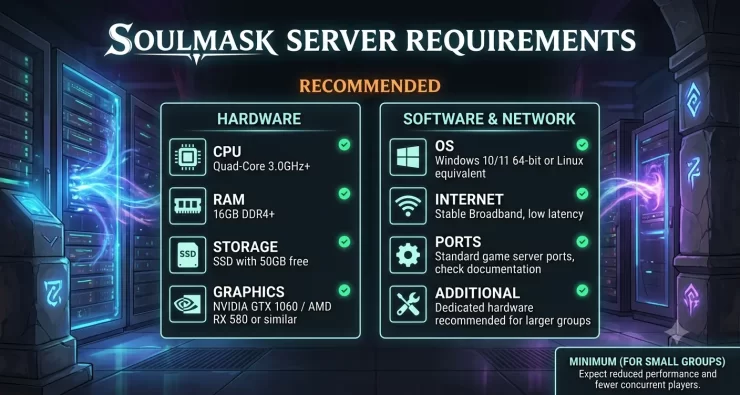
Soulmask Server Requirements at a Glance
Here are the main requirements for running a Soulmask dedicated server.
| Component | Minimum/Developer Guidance | Practical Recommendation |
|---|---|---|
| CPU | 2–4 CPU cores | 4 modern high-speed cores |
| RAM | 16 GB per server process | 16–32 GB depending on server activity |
| Storage | About 20 GB free | 30–50+ GB SSD/NVMe |
| Operating System | Linux Server or Windows Server | Either, based on your admin experience |
| Network | ~100 Kbps/player inbound/outbound | Stable low-latency broadband |
| Game Port | 8777/UDP | Open/forward to server |
| Query Port | 27015/UDP | Open/forward to server |
| SteamCMD | Required | Keep updated |
| Dedicated GPU | Not listed as a server requirement | Usually unnecessary for dedicated hosting |
The 16 GB RAM figure deserves particular attention. It comes from the dedicated-server documentation rather than Soulmask’s Steam PC system requirements.
Don’t Confuse Server Requirements With Soulmask PC Requirements
Soulmask’s Steam page lists 16 GB RAM as the minimum and 24 GB as recommended for playing the game. It also lists GPUs such as the GTX 970 and RTX 3060. Those specifications apply to the game client, not to a headless dedicated server.
You should therefore avoid sizing your dedicated server from the Steam client requirements.
A Soulmask server doesn’t need to render the game on a monitor. CPU processing, available RAM, storage performance, network quality, and server configuration matter much more.
Minimum vs Recommended Soulmask Server Requirements
The published minimum is useful when checking whether existing hardware can start the server. For a server that will stay online for weeks or months, you should also leave resources for the operating system, backups, updates, and load spikes.
CPU Requirements
Soulmask’s server documentation calls for 2–4 CPU cores per game process.
For a small private server, four modern CPU cores are a sensible target.
CPU load comes from more than connected players. The server must process:
- Player movement and combat
- NPC and tribesman behavior
- World simulation
- Building changes
- Crafting
- Inventory activity
- Save operations
- Multiplayer synchronization
This is why a newer CPU with strong per-core performance can be more useful than an older processor with many slow cores.
Don’t assume that eight or sixteen cores automatically make the server faster. Soulmask does not necessarily distribute every game-server operation evenly across all available cores.
If you intend to run multiple Soulmask server processes, allocate CPU capacity for each process instead of sizing the machine for only one instance.
RAM Requirements
16 GB should be treated as the minimum starting point for one Soulmask server process.
The private-server documentation explicitly specifies at least 16 GB per process.
Current server operators and hosting guides also report high baseline memory consumption. WinterNode, for example, reports approximately 11–12 GB of RAM consumption before significant player activity and recommends additional memory as tribes, world data, and player activity grow. These are practical observations rather than official Soulmask specifications.
That distinction matters.
A physical machine with exactly 16 GB of total RAM does not provide all 16 GB to Soulmask. Windows or Linux, SteamCMD-related processes, monitoring tools, backup software, and other services also require memory.
For this reason:
- 16 GB: workable for a small private server
- 24 GB: better for an active long-term private server
- 32 GB: safer for larger communities, larger worlds, or heavier modification
Avoid relying on claims that 8 GB is enough for a normal dedicated server. They conflict with the developer-linked server documentation.
Storage Requirements
The Soulmask private-server guide says the game package itself is only around 1–2 GB, but recommends approximately 20 GB of free disk space for operation.
In practice, you should allocate more.
Your storage also needs space for:
- Saved worlds
- Configuration files
- Logs
- SteamCMD updates
- Mods
- Temporary files
- Backups
- Multiple restore points
For a new private server, 30–50 GB provides more useful headroom than allocating exactly 20 GB.
Use an SSD where possible. NVMe storage is preferable if you already have it, especially for a server performing frequent save, backup, and update operations.
An NVMe drive will not compensate for an undersized CPU or insufficient RAM, but there is little reason to build a new dedicated game server around a mechanical HDD.
Network and Bandwidth Requirements
Soulmask’s dedicated-server documentation estimates approximately 100 Kbps of inbound and outbound bandwidth per player.
Ten players would therefore represent roughly 1 Mbps in each direction based on that published estimate.
Don’t size a connection around that number alone.
A home-hosted server also needs:
- Stable upload speed
- Low packet loss
- Reasonable latency to players
- Router access
- Port forwarding
- Firewall configuration
- A connection that remains stable for long sessions
Latency often matters more to players than a large headline bandwidth number.
Hosting a server in India for players located entirely in Western Europe, for example, may produce noticeable latency even if the server has a fast internet connection.
For geographically distributed groups, choose a server location close to the majority of active players.
Soulmask Server Requirements by Player Count
Soulmask does not publish an official CPU-and-RAM table for every possible player count.
The following configurations should therefore be treated as practical sizing estimates, not official specifications.
| Players | RAM | CPU | Suggested Storage |
|---|---|---|---|
| 2–5 | 16 GB | 2–4 modern cores | 30 GB+ |
| 6–10 | 16–24 GB | 4 modern cores | 30–50 GB |
| 11–20 | 24 GB | 4 strong cores | 50 GB+ |
| 20+ | 32 GB+ | 4+ high-performance cores | 50–100 GB |
Current hosting guides commonly place small private servers around 16 GB, medium servers around 24 GB, and larger communities around 32 GB.
However, player count alone is a poor sizing metric for Soulmask.
Consider two ten-player servers.
The first has a new world, small bases, few recruited tribesmen, and limited exploration.
The second has been running for months. Players have large compounds, many NPCs, extensive storage, automated work, mods, and large portions of the world in use.
The second server can place substantially more pressure on its resources despite having the same number of players.
Leave room for the world to grow rather than buying hardware based only on the number of slots you plan to advertise.
Windows vs Linux for a Soulmask Dedicated Server
Soulmask supports both Windows Server and Linux Server for private dedicated servers.
Neither operating system is automatically the correct choice for everyone.
Choose Windows if:
- You already administer Windows servers
- You prefer Windows-based tools
- You are more comfortable with PowerShell and Windows Firewall
- You want easier local troubleshooting through familiar desktop tools
Choose Linux if:
- You already manage Linux servers
- You want straightforward SSH administration
- You use shell scripts or systemd for automation
- You run multiple game servers on dedicated infrastructure
- You prefer a minimal operating-system installation
Linux often runs with fewer background desktop services than a normal Windows installation, which can leave additional system resources available. That does not mean Linux automatically gives better Soulmask performance.
There is no official Soulmask benchmark proving that one operating system universally delivers higher server performance.
Choose the platform you can maintain reliably.
Soulmask SteamCMD Requirements
Soulmask uses SteamCMD to download and maintain dedicated-server files.
The private-server documentation identifies separate dedicated-server application IDs for the operating systems:
- Windows dedicated server: App ID
3017310 - Linux dedicated server: App ID
3017300
Pay attention to this distinction when following third-party tutorials. Using the Windows server App ID in Linux installation instructions can result in an incorrect installation.
SteamCMD also makes server updates easier to automate. This matters because Soulmask continues to receive game updates, and mismatched client/server versions can cause connection problems.
Before applying a major update, back up the server’s saved data rather than relying solely on the update process.
Soulmask Server Ports
A basic Soulmask dedicated server needs two public UDP ports.
| Port | Protocol | Purpose |
|---|---|---|
| 8777 | UDP | Main game connection |
| 27015 | UDP | Steam query |
| 18888 | TCP | Local Echo/Telnet management |
| 19000 | TCP | RCON where configured |
The official-style private-server documentation specifically states that each game process needs two UDP ports, with 8777 and 27015 as the defaults. These values can be changed through command-line parameters.
One common mistake is forwarding the query port as TCP instead of UDP. That can leave the server running locally while preventing it from appearing or responding correctly through the multiplayer server browser.
For home hosting, check three places if friends cannot connect:
- Router port-forwarding rules
- Operating-system firewall
- Server startup parameters
Also check whether your ISP places your connection behind CGNAT. Traditional inbound port forwarding may not work when you do not have a publicly reachable IPv4 address.
Do not expose remote-management ports to the public internet unless you actually need them and have restricted access appropriately.
Can You Host Soulmask on Your Gaming PC?
Yes, but the answer depends on the resources left after running the game client.
Soulmask itself requires at least 16 GB of system RAM on the client PC, while its Steam recommended specification lists 24 GB.
The dedicated-server process separately calls for at least 16 GB.
That makes a 16 GB gaming PC a poor candidate for simultaneously running both the client and the dedicated server.
A 32 GB machine may be workable for a very small group, but available memory can become tight after Windows, Soulmask, the server process, browser applications, voice chat, and other background programs are included.
A second PC or dedicated machine is a better option when you want:
- 24/7 availability
- Several regular players
- Long-running progression
- Better isolation
- Easier restarts and maintenance
You also avoid forcing everyone else offline whenever you shut down your gaming PC.
Self-Hosting vs VPS vs Managed Soulmask Hosting
There are three practical ways to run a permanent Soulmask server.
| Option | Administration | Control | Best For |
|---|---|---|---|
| Home server | High | Full | Users with spare hardware |
| VPS/dedicated server | High | Full | Experienced administrators |
| Managed game hosting | Low | Moderate | Players who want simple management |
Self-Hosting
Self-hosting makes sense when you already own suitable hardware and know how to manage networking, SteamCMD, updates, backups, and operating-system security.
It can also be inexpensive if the server hardware would otherwise sit unused.
The tradeoff is maintenance. Power failures, internet outages, router changes, server updates, and hardware faults become your responsibility.
VPS or Dedicated Server
A VPS removes the home-internet problem and places the server in a data center.
Before renting one, check the actual CPU allocation and available RAM. A cheap VPS advertising several virtual CPU cores does not necessarily provide the same performance as four dedicated modern CPU cores.
Given Soulmask’s memory requirements, low-cost 4–8 GB VPS plans are not appropriate.
Managed Soulmask Hosting
Managed hosting is the simpler option if you want the private-server benefits without manually handling SteamCMD, server updates, networking, and backup jobs.
DatHost, for example, currently advertises a Soulmask plan at €14.90/month on monthly billing. The plan includes 16 GB DDR5 RAM, Ryzen 9 7950X or similar/EPYC processing, 30 GB NVMe storage, DDoS protection, automatic updates, daily backups, and a 14-day money-back guarantee. DatHost also lists a 1 Gbps+ network connection and multiple server locations.
That configuration aligns well with the published 16 GB RAM baseline for a Soulmask process.
DatHost makes the most sense for players who would rather manage the game through a control panel than maintain a Windows or Linux server themselves.
Pricing and hosting specifications can change. Check the provider’s current plan before ordering.
Common Soulmask Server Performance Problems
Hardware isn’t the only reason a Soulmask server can feel slow.
Rubberbanding
Players may move forward and suddenly snap backward. This can come from server load, packet loss, latency, network congestion, or game-side networking behavior.
Recent community discussions show that rubberbanding can occur even on privately hosted Soulmask servers, so moving to more powerful hardware does not guarantee that every networking problem disappears.
Running Out of RAM
Watch memory usage over time rather than checking only immediately after installation.
If the server operates close to its memory limit, consider adding RAM before a larger community joins.
Incorrect Port Configuration
Verify that ports 8777 and 27015 use UDP.
A server may launch correctly yet remain unreachable because the router or firewall uses the wrong protocol.
Slow or Aging Worlds
If performance degrades after weeks of play, compare current CPU and RAM usage with your original baseline.
World growth, player construction, NPC activity, modifications, and additional server processes may change resource demand.
Server Updates
Back up your world before updates.
Keep SteamCMD update procedures documented so that you can reproduce or repair the installation rather than troubleshooting from memory after a failed update.
Final Recommendation
For most small Soulmask private servers, start with 16 GB of RAM, 2–4 modern CPU cores, SSD or NVMe storage, and a stable low-latency internet connection. Treat 16 GB as the baseline rather than assuming it will suit every long-running world.
If you expect 10–20 active players, large tribes, extensive building, or a world you plan to keep for months, 24 GB of RAM provides safer headroom. For larger communities or heavier workloads, consider 32 GB.
Self-hosting gives you the most control, but it also leaves SteamCMD updates, port forwarding, backups, networking, and uptime in your hands. If you prefer to manage the game instead of the underlying server, a managed provider such as DatHost removes much of that administration.
Most importantly, don’t size your server from Soulmask’s Steam PC requirements. The game client and dedicated server perform different jobs, and the dedicated-server specifications should be the starting point for your hardware decision.
Frequently Asked Questions
A single Soulmask dedicated-server process requires at least 16 GB of RAM according to the private-server documentation. For an active long-term server, 24 GB provides more headroom. Larger communities, large tribes, or heavily modified worlds may benefit from 32 GB or more. Yes, 16 GB can work for a small private Soulmask server, but it is the documented minimum rather than a generous allocation. Remember that the operating system and background services also require memory. Consider 24 GB when you expect regular activity or want more room for world growth. Soulmask's dedicated-server documentation specifies 2–4 CPU cores per game process. Four modern cores are a good target for most private servers. Larger or busier environments may benefit from additional CPU capacity, especially when running several game-server instances. The dedicated-server operating requirements do not list a graphics card. A headless game server does not need to render Soulmask as a player sees it, so CPU, RAM, storage, and networking should be your main hardware priorities. The default public ports are 8777/UDP for the game connection and 27015/UDP for Steam queries. Both can be changed through server command-line parameters. Confirm that your router and firewall allow the selected UDP ports. How much RAM does a Soulmask server need?
Is 16 GB RAM enough for a Soulmask server?
How many CPU cores does a Soulmask server need?
Does a Soulmask dedicated server need a GPU?
What ports does a Soulmask server use?