Running a dedicated Sons of the Forest server gives your group a persistent world that remains available even when the original host is offline. Players can explore, build bases, gather resources, and continue their shared game without relying on one person’s computer or internet connection. The challenge is choosing a host that offers stable performance, a nearby server location, dependable backups, and straightforward management without charging for features your group does not need.
For most players, DatHost is the best overall Sons of the Forest server hosting provider in this comparison. Its listed price of €14.90 per month gives it a strong balance of server resources, eight-player support, backup features, and ease of management. G-Portal is a practical choice for flexible rental periods, while Apex Hosting is better suited to beginners who want a guided control panel and accessible support.
We compared six providers—DatHost, G-Portal, Apex Hosting, ZAP-Hosting, HostHavoc, and Shockbyte—using criteria that directly affect the hosting experience. These include listed price, player capacity, server locations, hardware disclosure, DDoS protection, backup tools, file access, refund terms, support availability, control-panel usability, and compatibility with third-party mods.
This article is based on provider documentation, published plan information, support policies, and available management features. It does not claim that every provider was purchased or independently benchmarked by LinuxBuz. Prices can also change according to location, billing period, taxes, promotions, and renewal terms. Check the final price and plan specifications at checkout before placing an order.
Affiliate disclosure: LinuxBuz may earn a commission when you purchase a server through links on this page. This does not increase your price. Providers are ranked using the evaluation criteria explained in this guide, not solely according to commission rates.
Best Sons of the Forest Server Hosts at a Glance
- DatHost: Best overall for disclosed resources, eight slots, backups, and a longer refund period.
- G-Portal: Best for prepaid rental periods and Gamecloud switching.
- Apex Hosting: Best for beginners who want guides and an accessible control panel.
- ZAP-Hosting: Best for buyers prioritizing a low listed starting price.
- HostHavoc: Best for responsive support and a straightforward eight-player plan.
- Shockbyte: Best for full file access, automatic backups, and panel features.
Sons of the Forest Hosting Comparison
| Provider | Listed Price | Players | Backups | Access | Refund Information | Best For |
|---|---|---|---|---|---|---|
| DatHost | €14.90/month | 8 | Automatic | Mods and settings | 14 days | Best overall |
| G-Portal | $12.94/month | 4–8 | Panel tools | FTP and mod guides | Request-based | Short rentals |
| Apex Hosting | $11.99/month | Plan-dependent | Available | Panel and FTP | Verify at checkout | Beginners |
| ZAP-Hosting | $7.69/month | Configurable | Plan-dependent | Web/file access | Limited; may use ZAP Coins | Low entry price |
| HostHavoc | $15.00/month | 8 | Panel tools | Config files | 72 hours on first purchase | Support |
| Shockbyte | $10.99 month | 8 | Automatic | Full file access | 72-hour self-service | Panel features |
Compare the renewal price, location, included resources, backup retention, and refund exclusions before paying.
6 Best Sons of the Forest Server Hosting for the Finest Gaming Experience
Let’s explore the list of the best Sons of the Forest game server hosting with its features and pricing plans.
1. DatHost — Best Overall
Starting price: €14.90 per month
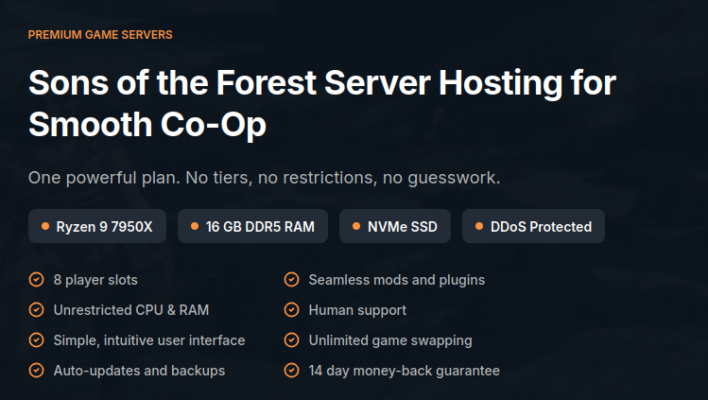
DatHost sells one Sons of the Forest plan with eight slots. It lists a Ryzen 9 7950X, 16GB DDR5 RAM, NVMe storage, DDoS protection, automatic updates and backups, and unrestricted CPU and RAM usage. The plan also includes a settings interface, game switching, and a 14-day money-back guarantee.
This resource disclosure matters because many hosts promote “high performance” without stating memory allocation. The 16GB plan gives a developed world and active group more headroom. DatHost also says it deploys updates promptly and waits until the server is unused to limit interruption.
Pros
- Eight slots and 16GB DDR5 RAM
- NVMe storage and modern Ryzen hardware
- Automatic updates and backups
- 14-day refund period
- Simple fixed-price plan
Cons
- The single plan may be excessive for two players
- Longer discounts require upfront payment
- Third-party mods can break after game updates
Verdict: Choose DatHost for disclosed resources, full-group capacity, and a longer evaluation period.
2. G-Portal — Best for Flexible Rentals
Starting price: $12.94 per month
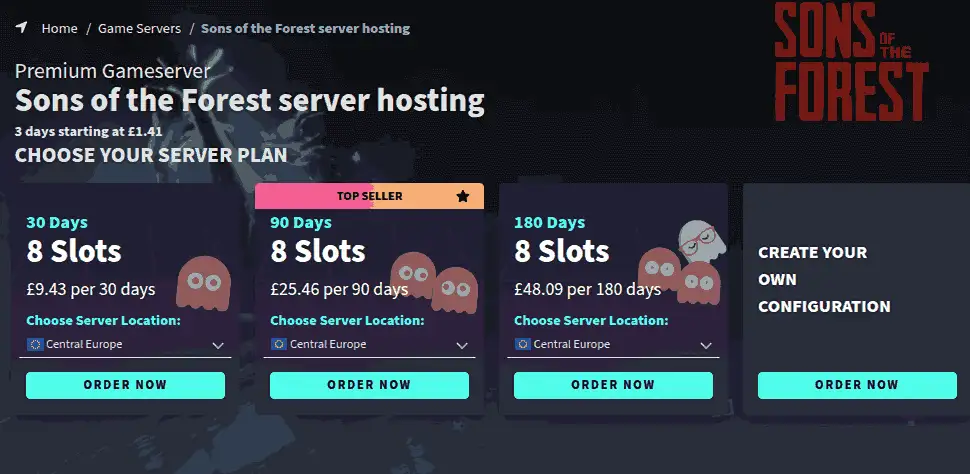
G-Portal suits groups that do not need a permanent server. Its prepaid Gamecloud model has no long contract and lets customers switch between supported games. G-Portal also publishes guides for joining a server, uploading saves, changing settings, managing administrators, and adding mods.
Selectable four-to-eight-slot configurations can prevent a small group from overpaying. However, refunds are handled through support rather than a clearly advertised universal guarantee. G-Portal advises customers to raise recent charges promptly.
Pros
- Four-to-eight-slot options
- Prepaid service
- Gamecloud game switching
- Detailed help articles
- Good for temporary campaigns
Cons
- Cost changes with slots, duration, and location
- Refunds are request-based
- Support availability is not continuous
Verdict: Pick G-Portal for flexible rental periods and extensive setup documentation.
3. Apex Hosting — Best for Beginners
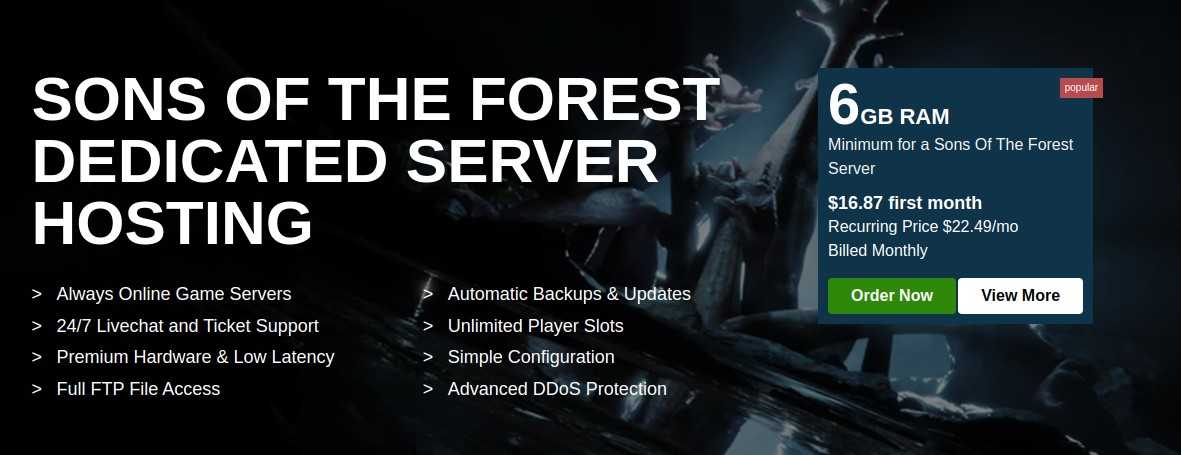
Starting price: $11.99 per month
Apex Hosting handles server deployment and updates through a browser-based panel. Users can adjust settings, manage files, upload worlds, add passwords, and change custom configurations. Apex publishes separate tutorials for these common tasks.
The guided experience is useful for first-time owners who do not want to configure SteamCMD, ports, or firewall rules. The trade-off is pricing complexity. Promotions, renewals, and RAM can depend on the chosen plan, so verify the recurring price and memory allocation.
Pros
- Beginner-friendly panel
- Automated deployment and updates
- FTP and configuration access
- Strong tutorial library
- Support for setup problems
Cons
- Headline and renewal prices may differ
- Plan selection can be confusing
- Managed controls may limit advanced users
Verdict: Apex is best for users who value panel usability and guidance over the lowest long-term price.
4. ZAP-Hosting — Best Low-Cost Entry Option
Starting price: $7.69 per month
ZAP-Hosting provides configurable game-server rentals and, in some regions, lifetime server purchases. Its web interface reduces command-line work, while customers can upgrade capacity through the account.
Flexibility can also make the final cost less predictable. The base price may increase after choosing performance, location, storage, or optional features. ZAP’s cancellation documentation says it does not generally provide a full cash refund through the standard process and may return value in ZAP Coins.
Pros
- Lowest supplied starting price
- Configurable plans
- Browser management
- Rental and lifetime options may be available
- Capacity upgrades
Cons
- Final price can exceed the base price
- Many configuration choices
- Refunds may be account credit
Verdict: ZAP suits careful buyers who prioritize entry price over simple refund terms.
5. HostHavoc — Best for Support
Starting price: $15.00 per month
HostHavoc offers an eight-player server with instant setup, DDoS protection, and 24/7 technical support. Its current guides cover joining, adding administrators, changing the server name, and setting a password.
The company says non-billing support departments average response times of ten minutes or less. An eligible first purchase can receive a full refund when requested within 72 hours.
Pros
- Eight-player plan
- 24/7 technical support
- Current game-specific guides
- DDoS protection and instant setup
- 72-hour first-purchase refund
Cons
- Higher price than several competitors
- Short evaluation period
- Confirm resource allocation before ordering
Verdict: HostHavoc fits groups that place responsive technical assistance above the lowest price.
6. Shockbyte — Best for File Access and Backups
Starting price supplied: $19.99 per month
Shockbyte’s official plan includes eight players, at least 8GB RAM, automatic backups, global locations, full file access, DDoS protection, automatic updates, 24/7 support, and a 72-hour self-service refund.
Full file access helps with save migration, configuration changes, and third-party modifications. Shockbyte’s panel includes console, configuration, backup, and file-management tools.
Pros
- Eight players and 8GB or more RAM
- Automatic backups and updates
- Full file access
- Global locations
- 72-hour self-service refund
Cons
- Three days is a limited test period
- Check the nearest location before buying
Verdict: Consider Shockbyte for file access and backup tools, but verify the real recurring cost.
How We Researched and Ranked the Hosts
This is a research-based comparison, not a claim that LinuxBuz purchased and benchmarked all six services. We reviewed official product pages, documentation, refund information, setup guides, and management features.
The ranking considers performance disclosure, eight-player support, server locations, backups, panel usability, documentation, support, price transparency, and file access. Hosts rank higher when they publish useful plan details and provide a balanced combination of resources, usability, data protection, and purchase protection.
Why Rent a Dedicated Sons of the Forest Server?
A locally hosted multiplayer world depends on one player’s computer and internet connection. When that player leaves, the session may stop for everyone else. A rented server runs independently, so approved players can join at different times and continue building, exploring, or gathering resources.
Managed hosting also removes much of the system administration. The provider installs the dedicated server software, exposes common settings through a control panel, and usually handles network protection and game updates. You still need to manage passwords, player access, save files, and optional third-party modifications, but you do not normally need to maintain Windows or Linux yourself.
A dedicated rental is most useful for groups that play several times per week, live in different locations, or want a persistent shared world. For an occasional two-player session, local hosting may be enough. For technical users who already operate a VPS or physical server, self-hosting can provide more control, although it also adds patching, firewall, backup, and troubleshooting work.
What to Check Before Buying
Do not choose from price alone. Check:
- Recurring cost: Separate first-month discounts from renewals.
- Location: Select the city nearest most players.
- Capacity: Confirm eight slots if your full group may join.
- Resources: Prefer disclosed RAM and CPU information.
- Backups: Check frequency, retention, and self-service restoration.
- World migration: Confirm upload and download access.
- Refund exclusions: Promotions and renewals may have different rules.
- Mods: Confirm file access and the required third-party loader.
An unmanaged VPS or dedicated server provides more control, but you must install SteamCMD, configure ports, secure the operating system, schedule backups, and troubleshoot updates. Beginners usually save time with managed game hosting.
Conclusion
DatHost is our top recommendation for most groups. Its €14.90 plan includes eight slots, 16GB DDR5 RAM, NVMe storage, automatic updates and backups, and a 14-day money-back guarantee. These published resources make the purchase easier to evaluate.
G-Portal is better for a short campaign or smaller group. Apex Hosting provides a more approachable beginner experience. ZAP-Hosting has the lowest supplied entry price, but its configuration and refund terms require careful review. HostHavoc stands out for technical support, while Shockbyte offers useful file and backup tools when its checkout price fits your budget.
Before paying, verify the renewal cost, location, resource allocation, backup retention, and refund exclusions. The best host is the one that places your server close to your group, protects your world, and gives you enough control without adding unnecessary administration.
Frequently Asked Questions
The managed plans reviewed here generally support up to eight players. Confirm the limit on the exact package you select. Most providers offer file or FTP access for migration. Download a complete backup before moving, then follow the new host’s upload instructions. Third-party mods are available, but compatibility can change after updates. A “mod support” label may only mean file access, so verify the required loader and installation process. A rental stays online without your gaming computer and avoids home-network port forwarding. Self-hosting may cost less, but you manage uptime, updates, security, backups, and troubleshooting. How many players can join a Sons of the Forest server?
Can I upload an existing world?
Does Sons of the Forest support server mods?
Is renting better than hosting on my PC?
- 👉
- 👉
- 👉
- 👉
- 👉
- 👉
- 👉
- 👉
- 👉
- 👉
- 👉