Palworld hosting requires more than a cheap monthly plan. Large bases, automated production, active Pals, frequent saves, and multiple players can consume substantial memory and CPU resources. A small plan may start normally, then develop rubber-banding, delayed actions, slow saves, or crashes as the world grows.
Palworld official page recommends four or more CPU cores, 16GB of RAM, and SSD storage. It says an 8GB server may boot but faces a greater risk of out-of-memory crashes, while more than 32GB can help larger servers. Windows and Linux are supported, and UDP port 8211 is used by default.
For a detailed breakdown of CPU, RAM, storage, operating system, ports, and player-based configurations, read our complete Palworld server requirements guide.
This guide compares six providers using published plan details, server resources, platform support, backups, refund terms, file access, locations, and setup difficulty. We have not invented latency tests or claimed that every service was independently benchmarked. Prices are the figures supplied for this comparison and may change by region, tax, promotion, player count, or billing period.
Affiliate disclosure: LinuxBuz may earn a commission when you purchase through links in this guide. This does not increase your price or determine the rankings.
Best Palworld Server Hosting at a Glance
DatHost is the best overall choice because its standard Palworld plan includes 16GB DDR5 RAM, unrestricted CPU use, unlimited slots, automatic backups, cross-play, and a 14-day money-back guarantee.
G-Portal is best for cross-platform groups that want 8 to 32 player slots, 50GB of backup space, and clearly stated PC, Mac, Xbox, and PlayStation support.
GravelHost is the best low-cost entry point for a small Steam group. Its $9 plan, however, includes only 4GB of RAM—well below Pocketpair’s recommendation.
Quick Comparison
| Provider | Starting Price | Best For | Entry Resources or Slots | Cross-Play | Refund |
|---|---|---|---|---|---|
| DatHost | €14.90/month | Best overall | 16GB DDR5; unlimited slots | PC, Xbox, PS5, Mac | 14 days |
| G-Portal | $15.55/month | Cross-platform groups | 8–32 slots | PC, Mac, Xbox, PlayStation | 72 hours |
| GravelHost | $9.00/month | Small Steam groups | 4 players; 4GB RAM | Steam on standard plan | 72 hours |
| Apex Hosting | $11.99/month | Beginners and support | Plan-dependent | Cross-play guides available | 7 days |
| ZAP-Hosting | €7.14/month | Flexible plans | 6 slots; 4GB entry configuration | Separate cross-play option | Check product terms |
| Shockbyte | $16.99/month | Established hosting tools | 10 players; 6GB RAM | Cross-play guidance available | 72 hours |
How We Ranked the Providers
We gave the most weight to included RAM, CPU transparency, price, player limits, server regions, DDoS protection, cross-play, backups, mod access, support, and refund coverage. Providers lost points when essential resources were hidden, the entry plan fell far below official requirements, or platform compatibility was unclear.
Top 6 Palworld Server Hosting Providers 2026
Let’s see each of the Palworld server hosting rated by Reddit users in detail, based on our key feature criteria.
1. DatHost – Best Overall Palworld Server Hosting
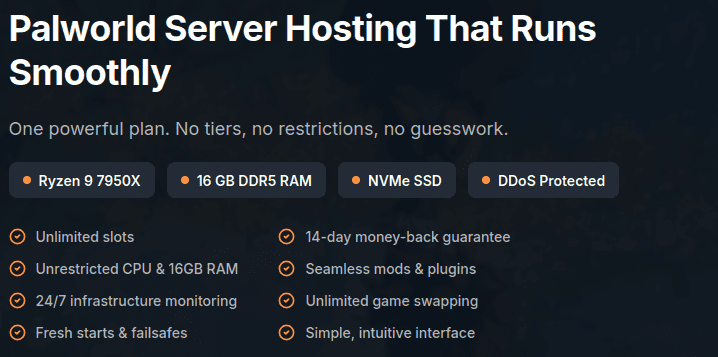
DatHost offers the strongest all-inclusive package here. The €14.90 monthly plan includes 16GB DDR5 RAM, unlimited slots, NVMe storage, DDoS protection, automatic updates, backups, and a 14-day refund period. Its published infrastructure uses AMD Ryzen 9 7950X-class or EPYC processors, while its Palworld page states that PC, Xbox, PS5, and Mac cross-play is supported.
The 16GB allocation meets Pocketpair’s recommendation without requiring a RAM upgrade. DatHost also provides a settings interface, world-transfer documentation, mod guidance, and server relocation. These tools suit beginners who want managed hosting and experienced administrators who still need file access.
The drawback is its single-plan model. A two-person group may pay for more power than it initially needs, but the extra memory provides room for larger bases and a growing community.
Pros: 16GB DDR5, unlimited slots, cross-play, automatic backups, modern CPU details, and 14-day refund protection.
Cons: No cheaper low-resource Palworld tier.
Verdict: Choose DatHost when you want one straightforward plan that meets the official memory recommendation.
2. G-Portal – Best for Cross-Platform Communities
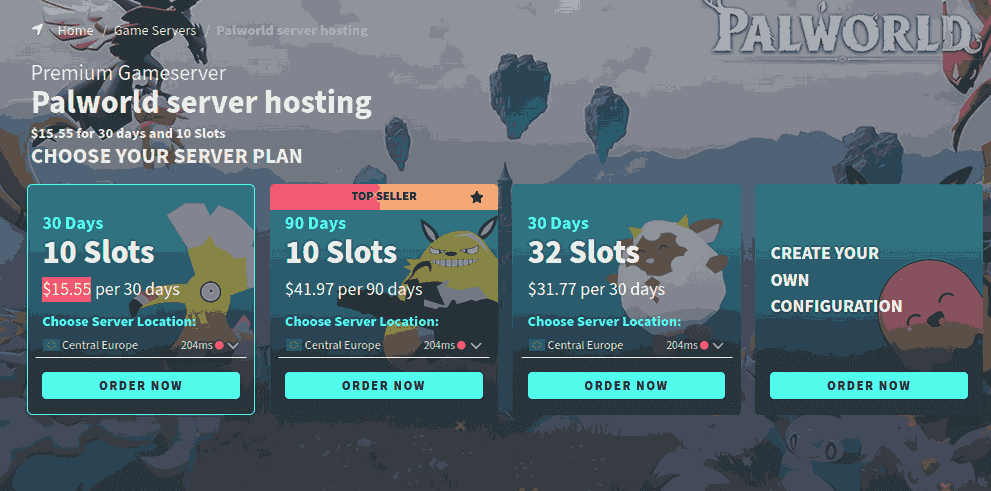
G-Portal is a practical option for groups divided across PC, Mac, Xbox, and PlayStation. Its current Palworld page advertises cross-play, 8 to 32 slots, 50GB of backup storage, DDoS protection, NVMe hardware, and deployment in under three minutes.
Its interface is designed for game-server management rather than general VPS administration. That simplifies settings changes, restarts, save restoration, and game switching. G-Portal also maintains Palworld guides for joining servers and adding mods.
The main limitation is resource transparency. The public product page shows slots but does not clearly state how much RAM or CPU capacity each package receives. Ask support for the reserved memory before ordering a busy 20- or 32-player world.
Pros: Clear cross-play support, 8–32 slots, 50GB backup space, quick deployment, and an established panel.
Cons: RAM and CPU allocations are not clearly displayed.
Verdict: G-Portal fits mixed-platform groups that value cross-play and simple administration.
3. GravelHost – Best Cheap Palworld Server Hosting
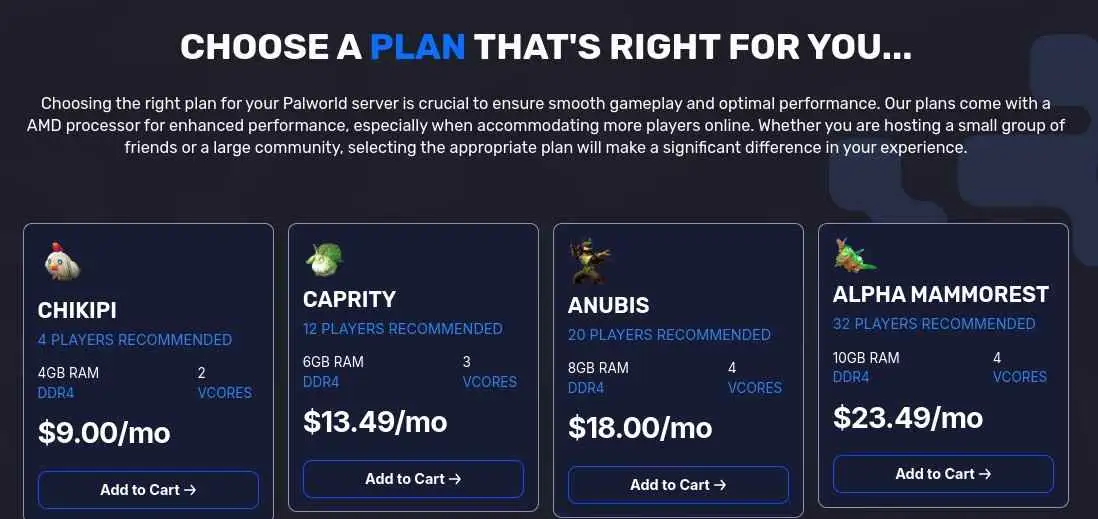
GravelHost starts at $9 per month for four players and 4GB of RAM. It lists 15 locations, fast deployment, DDoS protection, full file access, and larger plans for 12- and 32-player communities. Its standard Palworld page currently describes Steam compatibility.
The entry price is attractive for a new world shared by a few friends. GravelHost also publishes the plan’s RAM and player count, making it easier to compare than services that show only a generic starting price.
The tradeoff is memory. Four gigabytes is far below Pocketpair’s 16GB recommendation. Treat this as a small test or starter plan, not an ideal package for a long-running world with large bases. Review the higher tiers before buying.
Pros: Low entry price, transparent RAM and player count, 15 locations, file access, and 32-player options.
Cons: Only 4GB on the cheapest plan; standard page states Steam support.
Verdict: GravelHost is best for a small, budget-conscious Steam group willing to upgrade later.
4. Apex Hosting – Best for Beginners and Support
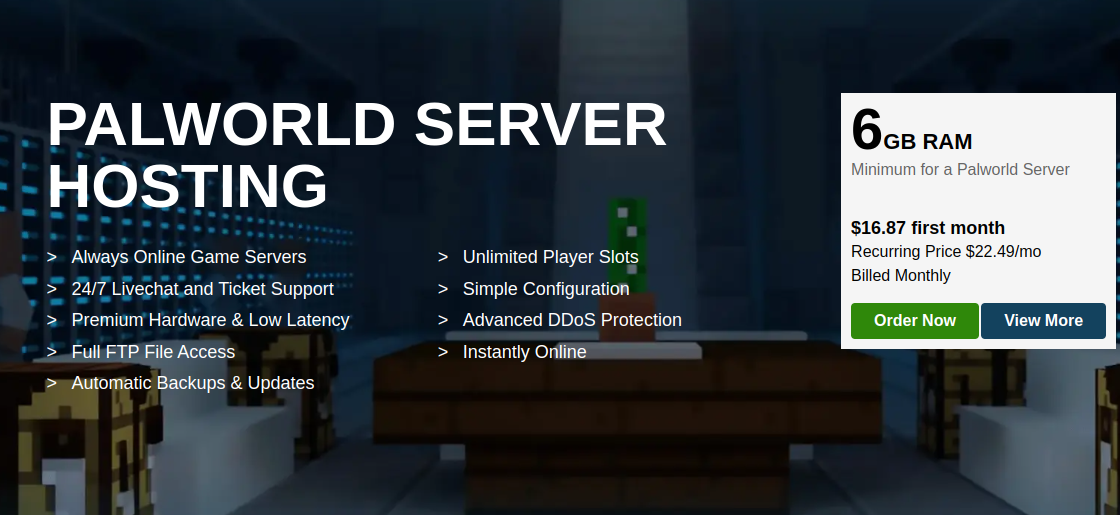
Apex Hosting focuses on guided management. Its Palworld service advertises instant setup, a browser-based panel, DDoS protection, automated backups, mod support, a free subdomain, and 24/7 assistance. Recent guides cover cross-play, save migration, settings, scheduled tasks, backups, and FTP access.
That documentation is useful when moving a co-op save, restoring a damaged world, or correcting a configuration mistake. The panel can also create manual backups before a risky update or mod change.
The concern is pricing and resource clarity. The public sales page does not make RAM allocation as easy to compare as DatHost, GravelHost, or Shockbyte. Confirm memory, CPU policy, renewal price, and refund terms for the $11.99 option before paying.
Pros: Beginner-friendly panel, 24/7 support, backups, FTP access, and detailed Palworld guides.
Cons: Exact public resource allocation needs more clarity.
Verdict: Apex suits owners who prioritize support and documentation over the lowest price.
5. Shockbyte – Best for Established Hosting Features
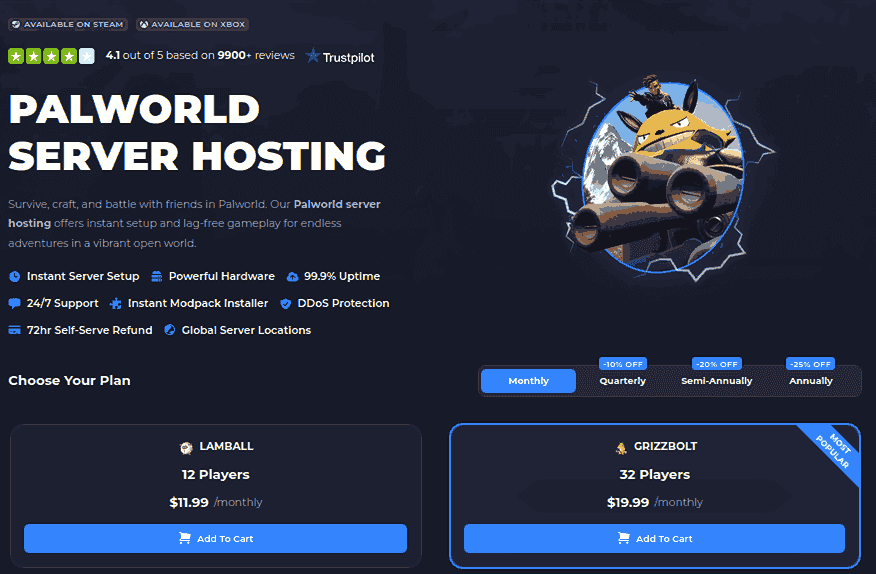
Shockbyte’s $16.99 Lamball plan supports ten players and includes 6GB of RAM. Its Palworld package lists instant setup, automatic updates, file validation, scheduled restarts, automatic backups, SFTP access, a console, DDoS protection, global locations, 24/7 support, and a 72-hour self-service refund window.
The named plans create a clear upgrade path for 20- and 32-player servers. Shockbyte also publishes cross-play and configuration tutorials.
The limitation is memory. Six gigabytes is below Pocketpair’s recommendation, so compare larger packages against your expected world size instead of relying only on the advertised player limit.
Pros: Automated maintenance, SFTP, 24/7 support, refund option, and clear upgrades.
Cons: Entry memory is below the official recommendation; the refund period is short.
Verdict: Shockbyte suits users who want familiar hosting tools and structured plan upgrades.
6. ZAP-Hosting – Best for Flexible Plans
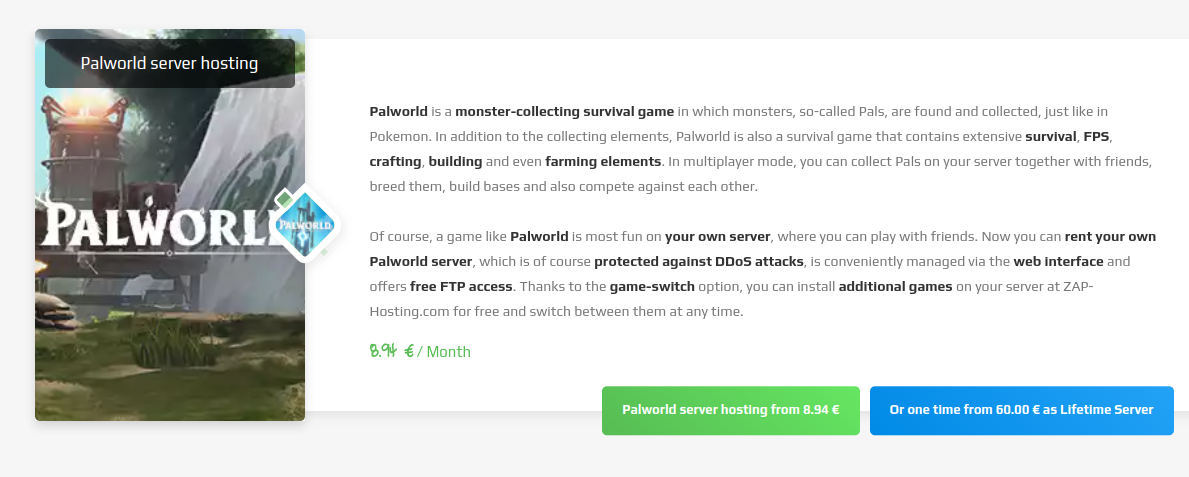
ZAP-Hosting includes automated setup, DDoS protection, FTP access, a configuration editor, console access, backup creation and import, and game switching. It also lists a separate Palworld cross-play product.
The entry configuration provides six slots and 4GB of RAM. ZAP offers monthly and lifetime-server choices, though a lifetime purchase should be compared carefully against upgrade, support, and hardware terms.
As with GravelHost, 4GB is below the official recommendation. RAM, slots, a dedicated IP, and other extras may raise the final cost. The €7.14 price may also depend on a discount or promotion.
Pros: Low starting price, FTP, configuration editor, DDoS protection, cross-play option, and game switching.
Cons: Only 4GB on the entry configuration; add-ons can increase the price.
Verdict: ZAP-Hosting works for buyers who value flexible configuration and may switch games.
What to Look for Before Buying
Start with RAM, not player slots. A plan promoted for ten users may still struggle when a mature world contains large bases, breeding farms, automated production, and many active Pals.
Choose a region near most players. A premium processor cannot remove network delay caused by hosting on another continent. Providers that permit relocation give a growing community more flexibility.
Check cross-play carefully. Palworld 1.0.2 supports Steam, Xbox and Microsoft Store, macOS, and PS5 on dedicated or community servers. Xbox and PS5 users need a community-server deployment so the server appears in the in-game list.
For mods, verify the operating system. Pocketpair currently states that server-side mods work only on the Windows dedicated-server edition. Mods must support servers and may cause crashes or save corruption, so create a backup first.
Finally, compare renewal pricing, refund exclusions, backup retention, restore access, and support channels. “Automatic backups” has limited value when a provider does not explain retention or whether customers can restore a save themselves.
Conclusion
Do not select a Palworld host from price alone. The cheapest plans here provide 4GB to 6GB of RAM, while Pocketpair recommends 16GB. Those entry packages may work for testing or a small new world, but they provide less room for growth.
DatHost offers the best balance for most groups because its standard plan includes 16GB DDR5 RAM, unlimited slots, cross-play, backups, and refund protection. G-Portal is easy to recommend for mixed-platform communities. GravelHost is the most approachable budget option for Steam users, while Apex is suited to beginners who value support. ZAP-Hosting provides flexible game switching and billing, and Shockbyte delivers a familiar panel with automated maintenance tools.
Before ordering, verify the final RAM allocation, renewal price, server region, refund rules, cross-play mode, and backup retention. Make a fresh backup before updates, migrations, or mod changes, and select a server location close to the majority of your players.
Frequently Asked Questions
Pocketpair recommends 16GB and suggests more than 32GB for larger servers. An 8GB server may run, but it has a higher risk of memory-related crashes. Treat 4GB and 6GB packages as entry tiers rather than ideal specifications for a mature world. Yes. Palworld supports Steam, Xbox and Microsoft Store, macOS, and PS5. Xbox and PS5 players need the server configured as a community server. Confirm that the selected host and plan support this mode. Yes, when the host provides a compatible Windows dedicated server and file access. Only server-compatible mods work, and Pocketpair warns that modifications may cause crashes or save corruption. DatHost is the strongest overall option because it includes 16GB RAM, unlimited slots, cross-play, backups, published hardware details, and a 14-day refund period. G-Portal is a strong cross-platform alternative, while GravelHost is cheaper for a small Steam group. How much RAM does a Palworld server need?
Does Palworld hosting support Xbox and PS5?
Can I install mods on a Palworld server?
Which Palworld host is best?
- 👉
- 👉
- 👉
- 👉
- 👉
- 👉
- 👉
- 👉
- 👉
- 👉
- 👉