
Last Updated on 25 Nov 2026
The best DayZ server hosting providers in 2027 are GravelHost, GPORTAL, Shockbyte, ZAP-Hosting, Host Havoc, and GTXGaming. GravelHost is our top overall pick for its affordable plans starting at $8.99 per month, NVMe storage, Steam Workshop integration, configurable player slots, and DDoS protection.
Whether you are exploring Chernarus with friends, surviving the frozen landscapes of Sakhal, exploring Nasdara in DayZ Badlands, or managing a heavily modded PvP community, choosing the right hosting provider is essential for stable multiplayer gameplay.
A reliable DayZ dedicated server provides better control over loot distribution, custom maps, player permissions, server restarts, mods, and persistent world data. However, insufficient CPU performance, limited RAM, or poor network connectivity can result in desynchronization, rubber-banding, and server crashes.
In this guide, we compare the six best DayZ server hosting providers based on pricing, hardware, mod support, server management, backups, scalability, and customer support.
Affiliate disclosure: This article contains affiliate links. We may earn a commission when you purchase hosting through these links, at no additional cost to you.
TL;DR – Best DayZ Server Hosting: Our Top Picks
- GravelHost: Best overall DayZ server hosting.
- GPORTAL: Best for beginners and flexible rental periods.
- Shockbyte: Best for simplified mod management and automatic backups.
- ZAP-Hosting: Best for flexible CPU and RAM configurations.
- Host Havoc: Best for modded DayZ community servers.
- GTXGaming: Best for advanced server administration and large communities.
Best DayZ Server Hosting: Quick Comparison
The following table compares the leading DayZ standalone server hosting providers to help you choose the right server for your budget, player count, and gameplay requirements.
| Hosting Provider | Starting Price | RAM | Player Slots | Best For |
|---|---|---|---|---|
| GravelHost | $8.99/month | 6 GB | Configurable | Best overall |
| GPORTAL | $22.55/30 days | Check configuration | 20 | Beginners |
| Shockbyte | $19.99/month | 8 GB | 8 | Simplified management |
| ZAP-Hosting | €9.99/30 days | 6 GB | Configurable | Flexible resources |
| Host Havoc | $18.50/month | Check configuration | 20 | Modded servers |
| GTXGaming | £10.99/month | Up to 10 GB | 10 | Advanced administration |
Prices reflect advertised configurations reviewed in November 2026. Actual pricing may vary depending on server location, taxes, billing period, promotions, and resource upgrades. Configurable or unlimited slots do not mean unlimited supported concurrent players.
6 Best DayZ Server Hosting Providers in 2027
1. GravelHost – Best Overall DayZ Server Hosting
Best for: Private DayZ servers, modded communities, PvP factions, and players seeking affordable, scalable hosting.
Starting price: $8.99 per month.
Customer support: 24/7 customer support.
GravelHost is our top recommendation for DayZ server hosting because it combines competitive pricing, transparent RAM allocations, Steam Workshop integration, and comprehensive server management tools.
Unlike hosting providers that charge primarily according to player slots, GravelHost offers resource-based hosting plans with configurable player limits. This allows administrators to choose server resources based on their world size, mod collection, and community activity.
Its custom control panel allows users to install compatible Steam Workshop mods, switch maps, edit server configuration files, manage player access, view server logs, and schedule backups.
GravelHost also provides international hosting locations across North America, Europe, Asia, and Australia, including locations in India, Singapore, Germany, the United Kingdom, and the United States.
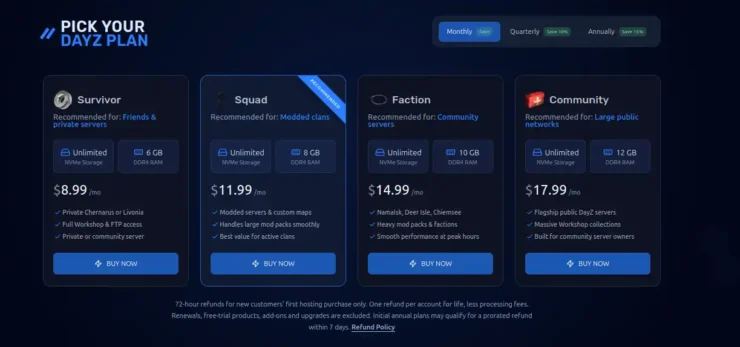
GravelHost DayZ Hosting Plans
| Plan | RAM | Monthly Price | Recommended Use |
|---|---|---|---|
| Survivor | 6 GB | $8.99 | Private vanilla servers |
| Squad | 8 GB | $11.99 | Small modded communities |
| Faction | 10 GB | $14.99 | Growing PvP and PvE communities |
| Community | 12 GB | $17.99 | Larger modded servers |
The Squad plan offers a practical starting configuration for players who want to install mods, run custom maps, and manage a small multiplayer community. Larger servers may require additional resources depending on actual usage.
GravelHost Key Features
- Affordable DayZ hosting starting at $8.99 per month.
- High-clock CPU infrastructure.
- NVMe SSD storage.
- Automated DayZ server deployment.
- Steam Workshop collection integration.
- Support for custom maps such as Namalsk and Deer Isle.
- Full FTP and server configuration access.
- Configurable player slots.
- Manual and scheduled server backups.
- Built-in DDoS protection.
- Global server locations.
- Custom game server control panel.
- Game switching on eligible plans with 8 GB RAM or more.
Pros
- Competitive pricing with clearly defined memory allocations.
- No fixed commercial player-slot limits on listed plans.
- Convenient Steam Workshop and custom map management.
- Suitable for vanilla and modded DayZ environments.
- Multiple international hosting locations.
- Flexible resource upgrades.
Cons
- Server owners must configure scheduled backups themselves.
- Entry-level 6 GB plans may be insufficient for demanding mod collections.
- Configurable player slots remain subject to actual hardware capacity.
Our verdict: GravelHost is our best overall DayZ server hosting choice for players seeking an affordable combination of performance-oriented hardware, flexible resources, mod support, and straightforward server administration.
2. GPORTAL – Best for Beginners and Easy Server Management
Best for: Players who want quick deployment, an intuitive control panel, and flexible DayZ server rental periods.
Starting price: $22.55 per 30 days for 20 player slots in the listed Central Europe configuration.
Customer support: 24/7 ticket-based support.
GPORTAL is an established game server hosting provider offering automated deployment, international infrastructure, Steam Workshop integration, and a beginner-friendly control panel.
The platform allows administrators to manage server settings, install compatible mods, select maps, upload saves, and configure player access without maintaining a separate operating system.
GPORTAL also supports DayZ Badlands and offers short-term hosting plans for players who want to evaluate the service before committing to a longer rental period.
Its Gamecloud functionality allows users to switch between supported games, making it useful for communities that play multiple survival titles.
GPORTAL DayZ Hosting Plans
| Player Slots | Billing Period | Listed Price |
|---|---|---|
| 20 slots | 3 days | $9.02 |
| 20 slots | 30 days | $22.55 |
| 60 slots | 30 days | $46.85 |
GPORTAL Key Features
- Server deployment advertised in under three minutes.
- NVMe SSD infrastructure.
- Steam Workshop mod installation.
- DayZ Badlands DLC support.
- 50 GB of included backup storage.
- Savegame upload and restoration tools.
- International hosting locations.
- DDoS protection powered by Bulwark and Corero.
- Gamecloud game switching.
- Flexible prepaid rental periods.
Pros
- Easy-to-use management interface.
- Suitable for first-time DayZ server administrators.
- Flexible short-term hosting options.
- Support for official and community maps.
- Included backup storage.
Cons
- Higher entry-level monthly pricing than several alternatives.
- Exact RAM allocation is not clearly displayed in the standard pricing table.
- Larger player-slot configurations can become expensive.
Our verdict: GPORTAL is an excellent alternative for beginners who prioritize ease of use, quick deployment, and flexible server rental periods.
3. Shockbyte – Best for Simplified DayZ Mod Management
Best for: Players who want straightforward server administration, automatic backups, and helpful mod installation documentation.
Starting price: $19.99 per month.
Customer support: 24/7 customer support and online knowledge base.
Shockbyte provides DayZ dedicated server hosting with automated deployment, mod support, file management, automatic backups, and DDoS protection.
Its hosting plans combine player-slot limits with defined RAM allocations, allowing customers to select configurations appropriate for private groups or larger multiplayer communities.
Shockbyte also provides DayZ-specific tutorials covering Steam Workshop mods, map changes, server connections, and game settings.
Shockbyte DayZ Hosting Plans
| Plan | RAM | Player Slots | Monthly Price |
|---|---|---|---|
| Berezino | 8 GB | 8 | $19.99 |
| Elektro | 10 GB | 24 | $28.99 |
| Cherno | 12 GB+ | 40+ | From $36.00 |
Shockbyte Key Features
- Automated DayZ server deployment.
- Steam Workshop mod support.
- Automatic updates and backups.
- Full FTP access.
- Configurable server settings.
- International hosting locations.
- Built-in DDoS protection.
- Advertised 99.9% uptime.
- 24/7 customer support.
- Advertised 72-hour self-service refund, subject to terms.
Pros
- Clearly defined memory and player-slot allocations.
- Helpful documentation for new server owners.
- Automatic backup and update functionality.
- Straightforward mod and map configuration.
- Flexible billing options.
Cons
- Entry-level pricing is higher than GravelHost.
- The cheapest plan supports only eight player slots.
- Larger communities require more expensive configurations.
Our verdict: Shockbyte is a practical choice for players who value simplified administration, automatic backups, and accessible technical documentation.
4. ZAP-Hosting – Best for Flexible DayZ Server Resources
Best for: Experienced administrators who want flexible CPU, RAM, and storage configurations.
Starting price: €9.99 per 30 days.
Customer support: Customer support through live chat and tickets.
ZAP-Hosting offers customizable DayZ dedicated server hosting with resource-based packages, NVMe storage, and a modern ZapX management interface.
Its hosting plans allow users to select different CPU, RAM, and storage allocations instead of purchasing hosting based primarily on player count.
This flexibility makes ZAP-Hosting particularly suitable for administrators managing customized loot economies, extensive mod collections, and growing multiplayer communities.
ZAP-Hosting DayZ Plans
| Plan | RAM | Advertised CPU Allocation | Price per 30 Days |
|---|---|---|---|
| ZAP Ranger | 6 GB | 3 CPU | €9.99 |
| ZAP Raid | 8 GB | 4 CPU | €12.99 |
| ZAP Guild | 10 GB | 4 CPU | €14.99 |
| ZAP Vanguard | 12 GB | 5 CPU | €17.99 |
| ZAP Legion | 16 GB | 6 CPU | €22.99 |
| ZAP Bastion | 24 GB | 8 CPU | €32.99 |
| ZAP Nexus | 32 GB | 10 CPU | €42.99 |
These configurations reflect the listed German hosting location. ZAP-Hosting recommends at least 8 GB RAM for DayZ, making its Raid plan a more appropriate starting point than its cheapest package for many users.
ZAP-Hosting Key Features
- Flexible CPU, RAM, and storage configurations.
- NVMe SSD storage.
- ZapX game server management interface.
- Configurable player slots.
- Steam Workshop and custom mod support.
- Browser-based configuration editing.
- DDoS-protected infrastructure.
- Multiple rental periods.
- Server monitoring and log management.
- Optional lifetime hosting arrangements.
Pros
- Extensive resource configuration options.
- Suitable for growing and heavily modded communities.
- Flexible rental periods.
- Transparent RAM and storage allocations.
- Advanced server management tools.
Cons
- The cheapest plan is below the provider’s recommended DayZ RAM allocation.
- Scheduled backups and some advanced features require ZapX Pass Pro.
- Resource pricing varies by server location.
Our verdict: ZAP-Hosting is a strong alternative for experienced DayZ administrators who prioritize infrastructure flexibility and configurable server resources.
5. Host Havoc – Best for Modded DayZ Community Servers
Best for: Modded DayZ communities, custom missions, and experienced server administrators.
Starting price: $18.50 per month for 20 player slots.
Customer support: 24/7 technical support.
Host Havoc is an established game server hosting provider offering comprehensive DayZ mod management, Steam Workshop integration, configuration access, and international hosting infrastructure.
Its management platform supports Steam Workshop collections, custom missions, community maps, and advanced server settings.
Host Havoc also supports DZSA Launcher integration, helping community administrators manage modded server discovery and simplify connections for players.
The service is particularly suitable for administrators running DayZ Expansion, custom traders, PvE missions, and public community servers.
Host Havoc Key Features
- One-click Steam Workshop mod installation.
- Steam Workshop collection support.
- Custom mission and map support.
- DZSA Launcher compatibility.
- Full FTP and file manager access.
- Server configuration and log management.
- DDoS-protected infrastructure.
- Automated server setup.
- International hosting locations.
- 24/7 technical support.
Pros
- Comprehensive mod management capabilities.
- Suitable for customized multiplayer communities.
- Full access to server files.
- Convenient Steam Workshop collection management.
- Clearly defined player-slot pricing.
Cons
- Higher entry price than resource-based budget hosting alternatives.
- Memory allocation should be confirmed for heavily modded configurations.
- Larger player-slot configurations can significantly increase monthly costs.
Our verdict: Host Havoc is a worthwhile option for established DayZ communities that require extensive mod support, flexible mission management, and technical assistance.
6. GTXGaming – Best for Advanced DayZ Server Administration
Best for: Large multiplayer communities, experienced administrators, and heavily customized DayZ servers.
Starting price: £10.99 per month for 10 player slots.
Customer support: 24/7 customer support.
GTXGaming offers DayZ standalone server hosting with advanced mod management, configurable hardware resources, international data centers, and extensive server administration tools.
Its DayZ hosting platform includes Steam Workshop integration, community map installation, DayZ Expansion Bundle support, VPPAdminTools, and DZSA Launcher synchronization.
GTXGaming offers customizable configurations with up to 127 player slots and up to 64 GB RAM, making it suitable for administrators who need additional memory and CPU priority for demanding multiplayer environments.
GTXGaming DayZ Hosting Plans
| Plan | Player Slots | RAM | Monthly Price |
|---|---|---|---|
| Lone Survivor | 10 | Up to 10 GB | £10.99 |
| Infected | 30 | 12 GB | £36.97 |
| Custom | 10–127 | Up to 64 GB | Configuration-dependent |
GTXGaming Key Features
- Steam Workshop integration and dedicated mod manager.
- One-click community map installation.
- DayZ Expansion Bundle support.
- VPPAdminTools integration.
- DZSA Launcher synchronization.
- Configurable CPU priority and memory.
- Offsite backup functionality.
- NVMe SSD storage.
- DDoS protection.
- Worldwide hosting locations.
- DayZ Badlands support.
- Advanced server configuration tools.
Pros
- Extensive hardware upgrade options.
- Strong mod and community map management.
- Suitable for large public DayZ communities.
- Multiple international server locations.
- Advanced administration capabilities.
Cons
- High player-slot configurations can become expensive.
- Additional CPU priority and memory upgrades increase costs.
- Extensive configuration options may overwhelm beginners.
Our verdict: GTXGaming is an excellent choice for experienced DayZ server administrators who require advanced configuration tools and extensive scalability.
DayZ Dedicated Server Requirements
DayZ dedicated server requirements differ from the requirements for running the game client. A headless dedicated server does not normally require a gaming graphics card.
Bohemia Interactive’s dedicated server documentation lists 6 GB of RAM as a reference requirement. However, actual resource needs increase according to player activity, mod complexity, map configuration, and persistent world data.
The following specifications provide practical planning guidance for commercial hosting and self-hosting.
| Component | Small Vanilla Server | Modded or Community Server |
|---|---|---|
| CPU | Modern high-clock CPU, 2–4 cores | High-performance CPU, 4+ cores |
| RAM | 6–8 GB | 12–16 GB or more |
| Storage | 30–50 GB SSD | 80–150 GB+ NVMe SSD |
| Operating system | Supported Windows or Linux | Supported Windows or Linux |
| Graphics card | Not normally required | Not normally required |
| Network | Stable broadband | Low-latency data center connection |
| Backups | Regular server-file backups | Scheduled and independent backups |
These are conservative deployment recommendations, not guaranteed capacity limits or independently measured benchmark results.
Large mod collections, extensive log files, and backup retention may require additional storage.
How Much RAM Does a DayZ Server Need?
A small vanilla DayZ dedicated server can generally start with 6–8 GB RAM. Modded servers and larger multiplayer communities should consider 10–16 GB or more, depending on simultaneous player activity and the complexity of installed modifications.
| Concurrent Players | Recommended Starting RAM | Suitable For |
|---|---|---|
| 1–10 players | 6–8 GB | Private vanilla gameplay |
| 10–20 players | 8–10 GB | Friends and light mod collections |
| 20–40 players | 10–12 GB | Growing multiplayer communities |
| 40–60 players | 12–16 GB | Active PvP and PvE servers |
| 60–100 players | 16–24 GB+ | Large modded communities |
| 100+ players | 24–32 GB+ | High-resource public servers |
These are editorial planning estimates rather than official requirements for specific player counts.
CPU performance can be more important than RAM for busy DayZ servers. Purchasing additional memory will not necessarily improve performance if game simulation is already limited by CPU resources.
For small private groups, GravelHost’s 6 GB Survivor plan is an affordable starting point. Its 8 GB Squad plan provides additional headroom for light modding.
How Much Does DayZ Server Hosting Cost?
DayZ server hosting typically costs around $9–$30 per month for smaller private or moderately customized servers. Large public servers with extensive mods, premium CPU allocations, and higher player counts can cost considerably more.
| Hosting Category | Approximate Monthly Cost |
|---|---|
| Cheap DayZ server hosting | $9–$15 |
| Standard private server | $15–$25 |
| Modded community server | $25–$50 |
| Large public server | $50–$100+ |
| High-performance bare metal server | $100+ |
| Self-hosted dedicated server | No hosting subscription using existing hardware |
GravelHost offers DayZ hosting starting at $8.99 per month, while Host Havoc offers a 20-slot configuration starting at $18.50 per month.
When comparing prices, consider the actual CPU allocation, RAM, player slots, backup options, storage, server location, and renewal terms.
A cheaper server with insufficient resources may ultimately cost more if frequent upgrades become necessary.
Best DayZ Server Hosting for PC, Xbox, and PlayStation
DayZ hosting requirements depend on which version of the game your community uses.
Traditional Steam PC servers provide the greatest flexibility for custom mods, maps, server administration tools, and third-party launchers.
Console hosting operates under different platform restrictions.
| Platform | Dedicated Hosting Options | Steam Workshop Mods |
|---|---|---|
| Steam PC | GravelHost, GPORTAL, Shockbyte, ZAP-Hosting, Host Havoc, GTXGaming and others | Yes |
| Xbox One / Series X/S | Nitrado console hosting | No |
| PlayStation 4 / 5 | Nitrado console hosting | No |
| Microsoft Store PC / PC Game Pass | Compatible Xbox hosting environment | No |
| Nintendo Switch 2 | Nitrado console hosting | No |
Best DayZ Server Hosting for PC
GravelHost is our top PC hosting recommendation because it combines affordable resource-based plans with Steam Workshop integration, configurable player slots, and server file access
Does DayZ Support Crossplay?
DayZ does not support unrestricted crossplay between Steam PC, Xbox, and PlayStation.
However, Update 1.29 introduced Xbox Play Anywhere support, allowing the Microsoft Store PC version of DayZ to connect to compatible Xbox keyboard-and-mouse servers.
This version uses the Xbox game environment and does not support Steam Workshop modifications.
Always verify platform compatibility before purchasing a DayZ server.
Best DayZ Server Hosting with Mods
Modded DayZ servers require reliable CPU performance, sufficient memory, Steam Workshop support, configuration access, and backup recovery tools.
The following hosting providers are worth considering for modded DayZ communities.
| Provider | Mod Management | Recommended Use |
|---|---|---|
| GravelHost | Steam Workshop collections and FTP | Affordable modded servers |
| GPORTAL | Integrated mod management | Beginners |
| Shockbyte | Workshop installation and documentation | Small modded groups |
| ZAP-Hosting | Flexible configurations and mod support | Resource-intensive customization |
| Host Havoc | Workshop collections and custom missions | Established communities |
| GTXGaming | Workshop and advanced Mod Manager | Large customized servers |
Popular DayZ modifications and administration tools include:
- Community Framework (CF).
- DayZ Expansion.
- VPPAdminTools.
- Community Online Tools.
- Dabs Framework.
- Namalsk Survival.
- Custom trader modifications.
- Community vehicle and base-building modifications.
Always check whether mods are compatible with the current DayZ release and with one another.
Large mod collections can significantly increase memory usage, server startup time, and troubleshooting complexity.
DayZ Server Hosting: Supported Maps and Expansions
The map you select affects the gameplay experience, required mods, and server configuration.
| Map | Type | Best For |
|---|---|---|
| Chernarus | Official base-game map | Traditional survival gameplay |
| Livonia | Official map | Forest-based exploration and survival |
| Sakhal | Frostline expansion | Extreme cold-weather survival |
| Nasdara | Badlands expansion | Desert survival and exploration |
| Namalsk | Community map | Hardcore survival |
| Deer Isle | Community map | Exploration-focused communities |
| Chiemsee | Community map | Customized multiplayer gameplay |
DayZ Badlands launched on October 15, 2026, alongside Update 1.30 and introduces Nasdara, a new desert survival environment.
When renting a DayZ Badlands server, verify that the provider has updated its server software and supports the required map configuration.
Players must own any required expansion to join its associated map.
GravelHost supports community maps and Steam Workshop content, while GPORTAL and GTXGaming explicitly advertise DayZ Badlands compatibility.
How to Choose the Best DayZ Server Hosting
Choosing the right DayZ hosting provider involves more than comparing monthly prices. The following factors are particularly important for persistent survival worlds.
1. CPU Performance and Server FPS
DayZ servers process infected AI, player actions, vehicle movement, loot spawning, persistence, and installed modifications.
Strong per-core CPU performance is essential, particularly during peak player activity.
Look for modern processors, transparent CPU allocations, and upgrade options. Avoid assuming that more virtual CPU cores automatically translate into better DayZ performance.
2. RAM and Resource Scalability
A private vanilla server requires fewer resources than a 60-player server running custom traders, vehicles, missions, and base-building modifications.
Choose a hosting provider that allows you to increase memory and CPU resources as your community grows.
3. NVMe SSD Storage
Fast storage helps with server startup, log management, persistence operations, and mod loading.
NVMe storage is preferable for larger servers, especially those with extensive modification files and frequent backups.
However, faster storage cannot compensate for insufficient CPU resources or poor network connectivity.
4. Server Locations and Network Latency
Select a hosting location close to most of your players to reduce unnecessary network delays.
| Player Location | Recommended Hosting Region |
|---|---|
| United States and Canada | North America |
| United Kingdom and Western Europe | UK or Germany |
| India and Southeast Asia | Mumbai or Singapore |
| Japan and South Korea | East Asia |
| Australia and New Zealand | Australia |
If your community includes players from different continents, select a location that provides acceptable latency for the majority.
Use provider ping-testing tools where available.
5. Steam Workshop and Custom Mod Support
A suitable modded DayZ hosting provider should offer:
- Steam Workshop installation.
- Mod collection management.
- Custom startup parameter access.
- FTP or SFTP access.
- Mod dependency management.
- Server logs and crash troubleshooting.
- Support for custom missions and maps.
Confirm that the host allows manual file management when automated mod installers are insufficient.
6. Backups and World Recovery
DayZ communities may spend hundreds of hours building bases, collecting equipment, and establishing persistent worlds.
Choose a provider that offers convenient backup creation and restoration.
Check whether backups are automatic, manually initiated, or require scheduling. Also review backup retention and whether external database files are included.
Keep an independent copy of your server data before installing major updates, changing maps, or migrating providers.
7. DDoS Protection and Administrative Security
Public DayZ servers can experience disruptive network attacks.
Choose a hosting provider that includes DDoS protection and offers secure administrative access.
Use strong administrator passwords, restrict access to RCON, and enable two-factor authentication where supported.
DDoS protection reduces the risk of disruption but does not guarantee uninterrupted service.
8. Control Panel and Customer Support
A good DayZ hosting panel should simplify configuration editing, mod management, server restarts, log monitoring, and backups.
Game-specific customer support is especially valuable when troubleshooting Central Economy configuration, incompatible mods, or world persistence problems.
9. Pricing and Refund Policies
Compare equivalent server configurations rather than simply choosing the cheapest advertised price.
Review billing terms, renewal pricing, CPU priority charges, additional storage costs, and refund eligibility before purchasing.
Important DayZ Dedicated Server Configuration Files
DayZ offers extensive customization through configuration files and mission directories.
Understanding these files is especially useful when running a modded or public multiplayer community.
| File or Directory | Purpose |
|---|---|
| serverDZ.cfg | Server name, password, player limits, persistence and mission settings |
| types.xml | Loot definitions, item quantities, lifetimes and economy parameters |
| events.xml | Dynamic world events and associated spawn configurations |
| globals.xml | Global Central Economy settings |
| cfggameplay.json | Supported gameplay rules and customization |
| cfgeconomycore.xml | Central Economy configuration and additional XML references |
| cfgspawnabletypes.xml | Item attachments and cargo spawn configuration |
| mpmissions/ | Mission files and map-specific configuration |
| storage_1/ | Common persistent world data directory |
| profiles/ | Common location for server profiles, logs and mod configurations |
| BEServer_x64.cfg | BattlEye remote administration configuration |
Exact file locations may vary according to the operating system, hosting provider, active mission, and startup parameters.
Always create a backup before modifying XML or JSON files. Invalid configuration syntax can cause startup failures, missing loot, or unexpected gameplay behavior.
How to Set Up a DayZ Dedicated Server
Most commercial hosting providers simplify DayZ installation through an automated deployment process.
Follow these steps to create your own DayZ server:
- Choose a DayZ hosting provider such as GravelHost.
- Select a plan based on your expected player count and mod requirements.
- Choose a server location close to your community.
- Complete the purchase and access the control panel.
- Select the appropriate official or community map.
- Configure the server name, player limits, password, and administrator settings.
- Install compatible mods if required.
- Configure automatic or scheduled backups.
- Start your DayZ dedicated server.
- Locate the server through the appropriate DayZ launcher or connect using the supplied address.
For Steam PC servers, confirm that the server and clients are using compatible game versions and mod configurations.
For private servers, enable password protection or supported whitelist functionality.
How to Install Steam Workshop Mods on a DayZ Server
Steam Workshop integration allows server administrators to customize gameplay with community-created content.
The installation process generally follows these steps:
- Select the desired DayZ mods from Steam Workshop.
- Review the required dependencies and current game-version compatibility.
- Create a complete backup of your server.
- Stop the server through the hosting panel.
- Add Workshop IDs or import a supported mod collection.
- Allow the hosting panel to download the files.
- Configure the required mod startup parameters.
- Install or verify required signature keys according to the mod instructions.
- Restart the server.
- Review server logs and test player connections.
Some modifications must be installed by both the server and connecting players. Others operate exclusively on the server.
Install and test mods in small batches to identify compatibility problems more easily.
Avoid installing dozens of untested modifications simultaneously on an established public server.
DayZ PvP vs PvE Server Hosting
DayZ community servers can offer competitive PvP gameplay, cooperative PvE experiences, or customized combinations of both.
| Feature | PvP Server | PvE Server |
|---|---|---|
| Primary gameplay | Player competition and combat | Cooperation and survival |
| Typical modifications | Combat rules, faction systems, base raiding | Missions, traders, AI and cooperative activities |
| Hosting priority | CPU performance and low latency | Persistent world stability |
| Administration | Moderation and competitive balance | Community management |
| Backup importance | High | High |
| Recommended RAM | Based on population and mods | Based on population and mods |
Best Hosting for DayZ PvP Servers
GravelHost and GTXGaming offer configurations worth evaluating for PvP communities because of their flexible resources and network protection.
Competitive servers should prioritize consistent CPU performance, stable network latency, reliable administration tools, and realistic player limits.
Best Hosting for DayZ PvE Servers
GravelHost, Host Havoc, and Shockbyte are suitable options for administrators who want cooperative gameplay, custom missions, and manageable mod configurations.
PvE servers running numerous AI-related modifications may require substantial CPU resources despite having less direct player-versus-player combat.
How to Transfer a DayZ Server to Another Hosting Provider
Migrating a DayZ server does not necessarily require resetting the world or deleting player progress.
The general migration process is:
- Stop your existing DayZ server safely.
- Download the current mission directory.
- Back up the active persistence directory.
- Save serverDZ.cfg and other configuration files.
- Back up profiles, mod settings, and external databases where applicable.
- Record Workshop IDs, dependencies, and startup parameters.
- Deploy a compatible DayZ server with the new provider.
- Upload your existing world and configuration data.
- Reinstall the required modifications.
- Start the server and verify player inventories, bases, vehicles, and loot persistence.
Some modifications store data outside the standard persistence directory, so copying only storage_1 may not preserve the complete server state.
Keep your original backup until the migrated server has been fully tested.
How We Selected the Best DayZ Server Hosting Providers
We compared the six DayZ hosting providers using publicly available pricing information, advertised server specifications, management capabilities, technical documentation, and suitability for different multiplayer workloads.
| Evaluation Criteria | Importance |
|---|---|
| CPU performance and resource transparency | High |
| Pricing and overall value | High |
| Steam Workshop and mod compatibility | High |
| Server locations and latency | High |
| Backups and persistence recovery | High |
| DDoS protection | High |
| Server configuration access | High |
| Ease of use | Medium |
| Player-slot and hardware scalability | Medium |
| Customer support | Medium |
Our recommendations represent an editorial comparison of published hosting information. They are not based on independent comparative performance benchmarks.
Actual server performance depends on resource allocation, infrastructure utilization, player activity, map selection, and installed modifications.
Which DayZ Server Hosting Provider Should You Choose?
The best provider depends on your budget, platform, player count, and technical requirements.
| Your Requirement | Recommended Provider |
|---|---|
| Best overall DayZ hosting | GravelHost |
| Cheap private DayZ server | GravelHost |
| Affordable modded DayZ hosting | GravelHost |
| Beginner-friendly hosting | GPORTAL |
| Short-term server rental | GPORTAL |
| Automatic backups and simple administration | Shockbyte |
| Flexible CPU and RAM configurations | ZAP-Hosting |
| Established modded community | Host Havoc |
| Advanced administration tools | GTXGaming |
| Large configurable community server | GTXGaming |
| Xbox or PlayStation hosting | Nitrado |
| Explicitly advertised DayZ Badlands support | GPORTAL or GTXGaming |
For most private PC communities, GravelHost offers a useful balance of competitive pricing, flexible resources, and straightforward server administration.
Conclusion: What Is the Best DayZ Server Hosting?
GravelHost is our top pick for DayZ server hosting in 2027, offering affordable plans starting at $8.99 per month, NVMe storage, Steam Workshop integration, configurable player slots, DDoS protection, and flexible RAM allocations.
GPORTAL is an excellent alternative for beginners, while Shockbyte offers straightforward management and automatic backups. ZAP-Hosting provides flexible hosting resources, Host Havoc is suitable for established modded communities, and GTXGaming offers advanced management and extensive scalability.
When choosing a DayZ dedicated server, prioritize strong CPU performance, sufficient memory, compatible mods, reliable backups, and a server location close to your players.
A 6–8 GB server is a reasonable starting point for small vanilla groups, while larger communities and heavily modded environments may require 12–24 GB or more.
If you want affordable DayZ standalone server hosting with comprehensive mod support and flexible player-slot configuration, GravelHost is our recommended starting option.
Frequently Asked Questions
What is the best DayZ server hosting provider?
GravelHost is our best overall DayZ server hosting pick because of its affordable pricing, configurable RAM plans, Steam Workshop integration, NVMe storage, and flexible server management.
What is the cheapest DayZ server hosting?
Among the providers compared, GravelHost offers an affordable DayZ hosting plan starting at $8.99 per month with 6 GB RAM. Compare equivalent resources and final checkout prices before choosing the cheapest option.
How much RAM does a DayZ server need?
A small vanilla DayZ server can generally start with 6–8 GB RAM. Modded servers and larger multiplayer communities should consider 12–16 GB or more, depending on player activity and installed modifications.
How much does a 60-player DayZ server cost?
A 60-player DayZ server can cost approximately $40–$80 or more per month, depending on hardware resources, mod requirements, hosting location, and CPU priority. GPORTAL lists a 60-slot configuration at $46.85 per 30 days.
Can I host a DayZ server for free?
Yes. You can install DayZ dedicated server software on your own compatible computer without paying a commercial hosting subscription. However, you remain responsible for hardware, electricity, internet connectivity, updates, and maintenance.
Recommended Game Server Hosting Guides
You may also be interested in these game server hosting comparisons:
- Best Game Server Hosting Providers
- Best PixARK Server Hosting
- Best FTB Server Hosting
- Best Enshrouded Server Hosting
- Best Satisfactory Dedicated Server Hosting
- Best Valheim Server Hosting
- Best Terraria Server Hosting
- Best Minecraft Bedrock Server Hosting
- Best 7 Days to Die Server Hosting
- Best The Forest Server Hosting