Counter-Strike 2 matches can be decided by milliseconds. A poorly located or overloaded server can cause delayed movement, unstable hit registration, packet loss, and frustrating lag during competitive rounds.
The best Counter-Strike 2 server hosting providers give you more than an online server. You should receive DDoS protection, current CS2 software, access to configuration files, backups, workshop map support, and a control panel that does not make basic tasks difficult.
You also need to check what the advertised price includes. Some companies charge per player slot. Others allocate RAM or require a minimum number of slots. Promotional prices may also increase after the first billing period.
We researched six CS2 hosting providers and compared their current plans, control panels, server locations, backup options, plugin support, refund terms, and published infrastructure information.
Prices were checked on August 5, 2026. Prices, currencies, discounts, and available locations can change. Confirm the final amount during checkout.
Affiliate disclosure: LinuxBuz may earn a commission when you purchase through links on this page. This does not increase your price. Provider positions are based on documented features, pricing, CS2 compatibility, and suitability for different server owners.
Best CS2 Server Hosting at a Glance
DatHost is our best overall CS2 server hosting choice. Its €13.86 monthly configuration includes 14 player slots, automatic backups, a seven-day refund period, instant location switching, CS2 practice tools, and one-click support for MetaMod and CounterStrikeSharp.
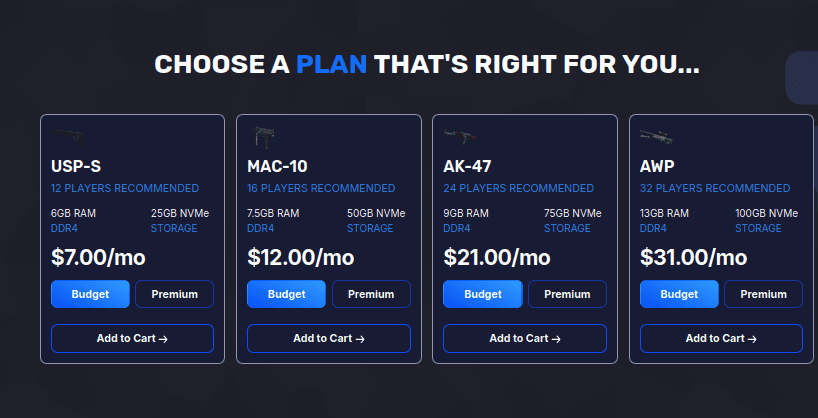
GravelHost is the best low-cost option. Its $7 plan includes 6GB RAM, 25GB NVMe storage, unlimited player slots, full FTP access, a plugin installer, and a 72-hour refund policy.
Choose G-Portal when you want a straightforward slot-based plan with 50GB of backup storage. Apex Hosting is suitable for beginners who want a low first-month price and 24/7 assistance. ZAP-Hosting stands out for game switching and lifetime payment options. HostHavoc is better suited to larger communities that need at least 20 slots and stronger management tools.
CS2 Hosting Comparison
| Provider | Best For | Starting Price | Entry Capacity | Refund Policy | Notable Feature |
|---|---|---|---|---|---|
| DatHost | Best overall | €13.86/month | 14 slots | 14 days | Practice presets and instant relocation |
| GravelHost | Budget hosting | $7/month | 6GB RAM; 12 players recommended | 72 hours | Low price and full FTP access |
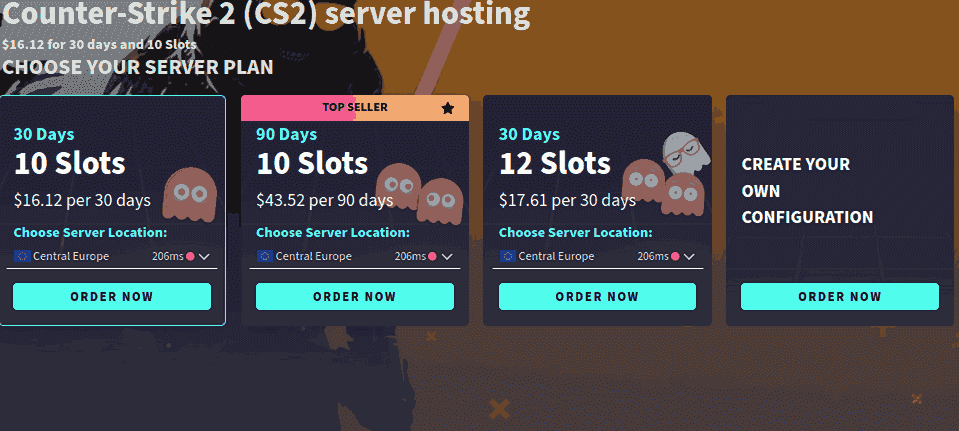
| G-Portal | Backups and simple setup | $16.12/month | Slot-based | Check regional terms | 50GB backup storage |
| Apex Hosting | Beginners | $2.99 first month | 1GB RAM | Check current terms | 24/7 live chat and automatic updates |
| ZAP-Hosting | Flexible billing | €5/month | Configurable | Check current terms | Monthly or lifetime server |
| HostHavoc | Larger communities | $10/month | 20 slots | Not clearly listed | TCAdmin and offsite backups |
The listed Apex price is promotional. Its 1GB plan renews at $3.99 per month. ZAP-Hosting prices vary by currency and configuration; its English product page displayed a $5.75 starting price during verification.
6 Best Counter-Strike 2 Server Hosting for 2026
We’ve reviewed the top-rated providers to help you find the best CS2 hosting option that fits your needs and budget.
1. DatHost
Best for competitive teams, scrims, and practice servers
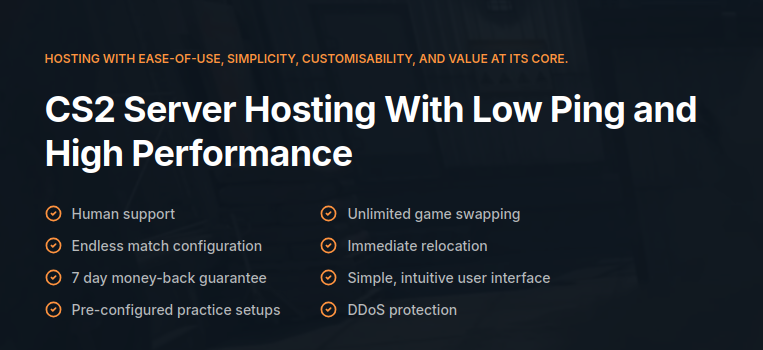
DatHost offers one of the most complete CS2-specific hosting packages in this comparison. Its €13.86 monthly configuration equals 14 player slots at €0.99 per slot.
That capacity works well for a normal 5v5 match while leaving space for coaches, administrators, or spectators.
DatHost provides preconfigured practice setups, automatic backups, DDoS protection, a server console, file management, API access, immediate server relocation, and a seven-day money-back guarantee. Its network currently lists 49 locations, including Mumbai, Singapore, Tokyo, Sydney, Frankfurt, London, New York, Dallas, and São Paulo.
The control panel supports workshop maps and CS2 plugins. MetaMod and CounterStrikeSharp can be activated through its plugin interface. MatchZy is also available for practice sessions and scrims.
What stands out:
- 14 slots for €13.86
- Seven-day refund period
- Practice and scrim configurations
- MetaMod and CounterStrikeSharp support
- Automatic backups
- Instant location switching
- Large international network
- Ryzen 9 or comparable processors
Tradeoff: DatHost costs more than the lowest-priced GravelHost and Apex plans. Its per-slot pricing can also become expensive when you need a large public server.
Verdict: DatHost is the strongest overall option for teams that want to launch a private practice or competitive server without manually configuring every component.
2. GravelHost
GravelHost offers the lowest-priced plan in this comparison without reducing the entry package to 1GB RAM.
The $7 USP-S plan includes 6GB RAM, 25GB NVMe storage, unlimited player slots, and a recommended capacity of 12 players. That makes it suitable for private matches, small practice groups, and new community owners.
Included tools cover full FTP access, a custom game panel, scheduled tasks, a plugin installer, firewall management, a free MySQL database, DDoS protection, and Discord-based support. GravelHost also advertises a 72-hour money-back policy and long-term storage of customer server data.
Its product page correctly states that CS2 uses Valve’s 64-frame and sub-tick architecture rather than promising a conventional 128-tick server.
What stands out:
- $7 monthly entry price
- 6GB RAM
- 25GB NVMe storage
- Unlimited configured slots
- 72-hour refund period
- Full FTP access
- Plugin installer
- Locations in North America, Asia, Australia, and Europe
Tradeoff: GravelHost separates budget and premium hardware. Server owners should check which CPU and location are included before purchasing. Its 72-hour refund period is also shorter than DatHost’s seven-day policy.
Verdict: GravelHost provides the best entry-level value for a small team that needs more memory than a basic 1GB plan.
3. G-Portal
Best for backup capacity and straightforward management
G-Portal is an established game-server provider with a simple slot-based CS2 ordering process. The starting price used for this comparison is $16.12 per month, although the final amount changes according to currency, location, slot count, and billing period.
Its CS2 package includes NVMe storage, DDoS protection from Bulwark and Corero, and 50GB of backup storage. G-Portal states that new servers can be available in under three minutes.
The web interface lets you change game settings, add a password, manage workshop maps, and operate competitive, casual, deathmatch, surf, retake, bunny-hop, and other community modes.
MetaMod and CounterStrikeSharp can be installed through FTP. G-Portal correctly explains that the older SourceMod framework is not compatible with CS2’s newer engine.
What stands out:
- Slot-based configuration
- 50GB backup storage
- NVMe server storage
- Multi-layer DDoS protection
- Workshop map support
- MetaMod and CounterStrikeSharp compatibility
- Fast automated deployment
Tradeoff: G-Portal is more expensive than the budget choices. Installing CS2 plugin frameworks may also require more manual work than DatHost’s one-click approach.
Verdict: G-Portal is a practical option for server owners who prioritize backup space and a familiar game-management interface.
4. Apex Hosting
Best for first-time server owners
Apex Hosting offers the lowest advertised first-month price in the comparison. Its 1GB CS2 plan costs $2.99 for the first month and renews at $3.99.
The service includes full FTP access, DDoS protection, automatic updates, backups, instant deployment, a free subdomain, and 24/7 live-chat and ticket support. Its control panel works on desktop and mobile devices.
Apex also provides higher-memory plans. The 5GB configuration costs $14.06 for the first month and renews at $18.75. Its EX Series uses dedicated processor cores and is aimed at larger or more demanding servers.
What stands out:
- $2.99 introductory price
- 24/7 live chat and tickets
- Automatic backups and updates
- Full FTP access
- Free server subdomain
- Mobile-accessible control panel
- Location ping-testing tool
Tradeoff: The cheapest plan includes only 1GB RAM and may not provide enough headroom for a busy community or several plugins. Buyers must also account for the higher renewal price.
Verdict: Apex is suitable for beginners who want guided support and a low-cost way to try a basic private CS2 server.
5. Zap-Hosting
Best for flexible billing and game switching
ZAP-Hosting supports standard recurring plans and one-time lifetime server purchases. The starting price supplied for this article is €5 per month, although its English product page showed $5.75 during verification.
Its CS2 service includes automated installation, a custom web interface, FTP access, configuration editing, backups, DDoS protection, an in-game console, and the ability to switch the server to another supported game.
You can also increase resources through the ordering interface. This is useful when your plugin count or community grows. ZAP says its servers are normally ready within several minutes after payment.
What stands out:
- Low starting price
- Monthly and lifetime payment options
- Game switching
- DDoS protection
- FTP and configuration access
- Manual backup controls
- Live chat, ticket, and email support
Tradeoff: The final cost can increase as you select more resources and add-ons. Its page also lists Intel E5-2650 v4 processors, which are older than the high-frequency Ryzen processors advertised by some competitors.
Verdict: ZAP-Hosting suits users who want flexible payment options or the ability to switch between different hosted games.
6. HostHavoc
Best for established communities needing 20 or more slots
HostHavoc starts at $10 per month for 20 player slots. This makes it less suitable for a small private 5v5 server but attractive for deathmatch, retake, surf, or public community servers.
Its CS2 servers run through a modified TCAdmin platform with a web console, file manager, log viewer, workshop installer, offsite backups, and data restoration tools.
HostHavoc also includes full FTP access, DDoS protection, NVMe storage, and 24/7 technical support. Its CS2 documentation covers GSLT configuration, workshop maps, passwords, scheduled restarts, MetaMod, and CounterStrikeSharp installation. Available locations include cities across North America, Europe, and the Asia-Pacific region, although some locations may be sold out.
What stands out:
- 20 slots for $10
- TCAdmin control panel
- Workshop installer
- Offsite backups
- MetaMod and CounterStrikeSharp guides
- Full FTP access
- 24/7 technical support
- Xeon and Ryzen infrastructure
Tradeoff: The 20-slot minimum is unnecessary for small teams. HostHavoc also does not clearly display a CS2-specific refund period on its main product page.
Verdict: HostHavoc offers strong value for larger public servers that need more slots, workshop content, backups, and detailed management controls.
What to Look for in CS2 Server Hosting
A Location Close to Your Players
Choose a data centre close to most of your players. A more expensive server in the correct location can provide a better experience than a powerful server located on another continent.
Do not select a location based only on your own connection. Ask regular players where they live and use the provider’s test IP or ping tool before ordering.
Modern CS2 Plugin Support
CS2 does not use the same plugin environment as older CS servers. The original SourceMod setup should not be advertised as the standard plugin solution for CS2.
Modern CS2 community servers commonly use MetaMod and CounterStrikeSharp. These frameworks support administration tools, practice configurations, retake modes, rank systems, warmups, and other server-side functions.
Valve describes CS2 as having tick-rate-independent gameplay. You should therefore be cautious when a host promotes “128-tick CS2 hosting” without explaining the claim.
Backups and File Access
Look for automatic backups, manual restore controls, and full FTP or SFTP access. Backups become important when you edit configuration files, install plugins, or experiment with workshop maps.
Check the backup retention period as well. “Backups included” may mean one local copy rather than several offsite restore points.
Clear Pricing
Compare the usable configuration rather than the smallest displayed number. A cheap 1GB plan may work for a basic private server but provide little capacity for plugins or a public community.
Check:
- Included slots or RAM
- First-month and renewal prices
- Minimum billing term
- Dedicated IP charges
- Backup charges
- Premium support fees
- Location surcharges
Managed CS2 Hosting or a VPS?
Managed game hosting is the better choice when you want a ready-to-use control panel, automatic updates, backups, and provider support.
A VPS gives you root access and more control over the operating system. It may also let you run multiple server instances. However, you must install SteamCMD, configure ports, apply updates, secure the operating system, manage backups, and troubleshoot failures yourself.
Choose managed CS2 hosting for convenience. Choose a VPS or dedicated server when you have Linux administration experience and need complete system control.
Conclusion
DatHost is the best Counter-Strike 2 server hosting provider for most teams. It combines 14 slots, practice configurations, modern plugin support, automatic backups, many server locations, and a seven-day refund period.
GravelHost is the better choice when price is your main concern. Its $7 plan provides 6GB RAM and enough recommended capacity for a private match. G-Portal offers generous backup storage, while Apex Hosting gives beginners a low first-month price and round-the-clock support.
Consider ZAP-Hosting when you want a lifetime server or plan to switch between games. Choose HostHavoc when you are building a larger community and need at least 20 slots, offsite backups, and stronger server-management tools.
Before paying, test the provider’s nearest location and verify the renewal price, included capacity, refund policy, plugin support, and backup limits. These factors matter more than the cheapest headline price.
Frequently Asked Questions
CS2 uses Valve’s sub-tick system and tick-rate-independent gameplay. Avoid selecting a provider only because it advertises “128 tick” without explaining how that claim applies to CS2. The original SourceMod environment is not the normal plugin solution for CS2. Most current community servers use MetaMod and CounterStrikeSharp. A private 5v5 match needs ten player slots. Choose at least 12 to 16 slots when you need space for coaches, spectators, administrators, or substitutes. Public communities may need 20 slots or more. Yes. All six providers offer file access or management tools that can be used for workshop maps. The exact installation process depends on the control panel. Does CS2 support 128-tick servers?
Does SourceMod work with CS2?
How many slots are needed for a CS2 server?
Can I install workshop maps on hosted CS2 servers?
- 👉
- 👉
- 👉
- 👉
- 👉
- 👉
- 👉
- 👉
- 👉
- 👉
- 👉